
Managing transfer fees is a crucial aspect of Solana token maintenance. Whether you're looking to adjust revenue streams, respond to market conditions, or implement new tokenomics strategies, knowing how to properly modify tax settings is essential. This guide covers everything you need to know about using 20lab's Solana tax config tool to change your token's transfer tax parameters.
What Is Solana Transfer Tax and How Does It Work?
Transfer tax (or fee) is an optional feature of Solana's Token-2022 program that automatically collects a percentage of tokens during transfers. These fees provide ongoing revenue to token projects, fund development activities, support treasury operations, or facilitate buyback and burn mechanisms.
Key features of Solana transfer tax:
- Applies to all standard transfers and DEX trades
- Does not apply to minting or burning operations
- Settings are managed by the designated transfer fee config authority
- Changes to tax settings have a built-in delay before taking effect
When to Change Solana Tax Settings and Why It Matters
Modifying your token's tax parameters isn't just a technical decision - it's a strategic one that can significantly impact your project's economics and user experience.
- Market Volatility Responses: When market conditions change dramatically, adjusting fees can help stabilize your ecosystem. During bull markets, a slight increase might be acceptable to users, while fee reductions during bear markets can stimulate continued activity.
- Project Development Phases: Different stages of your project may require different revenue models. Higher fees might be appropriate during early development to fund core features, while mature projects often reduce fees to encourage wider adoption.
- Community Feedback Implementation: If your community consistently raises concerns about fee levels, addressing these concerns through thoughtful adjustments can strengthen trust and participation.
- Strategic Tokenomics Evolution: As your project grows, your tokenomics may need to evolve. Transfer fee adjustments can be part of broader strategic changes to your token's economic model.
Why 20lab's Solana Tax Config Tool Stands Out
What makes 20lab's tax config tool essential for your Solana token? The platform offers several unique advantages that set it apart from other solutions:
- Authority Status Display - the tool automatically identifies and displays the current transfer fee config authority holder, providing immediate verification of your permissions before you attempt any tax modifications.
- Unified Token Management - the Solana tax config tool is part of 20lab's comprehensive token management suite, allowing seamless integration with other functions like authority transfers, SPL token creation, and configuration updates.
- User-Friendly Design - the intuitive interface guides you through each step of the process, making tax configuration accessible to both technical and non-technical team members.
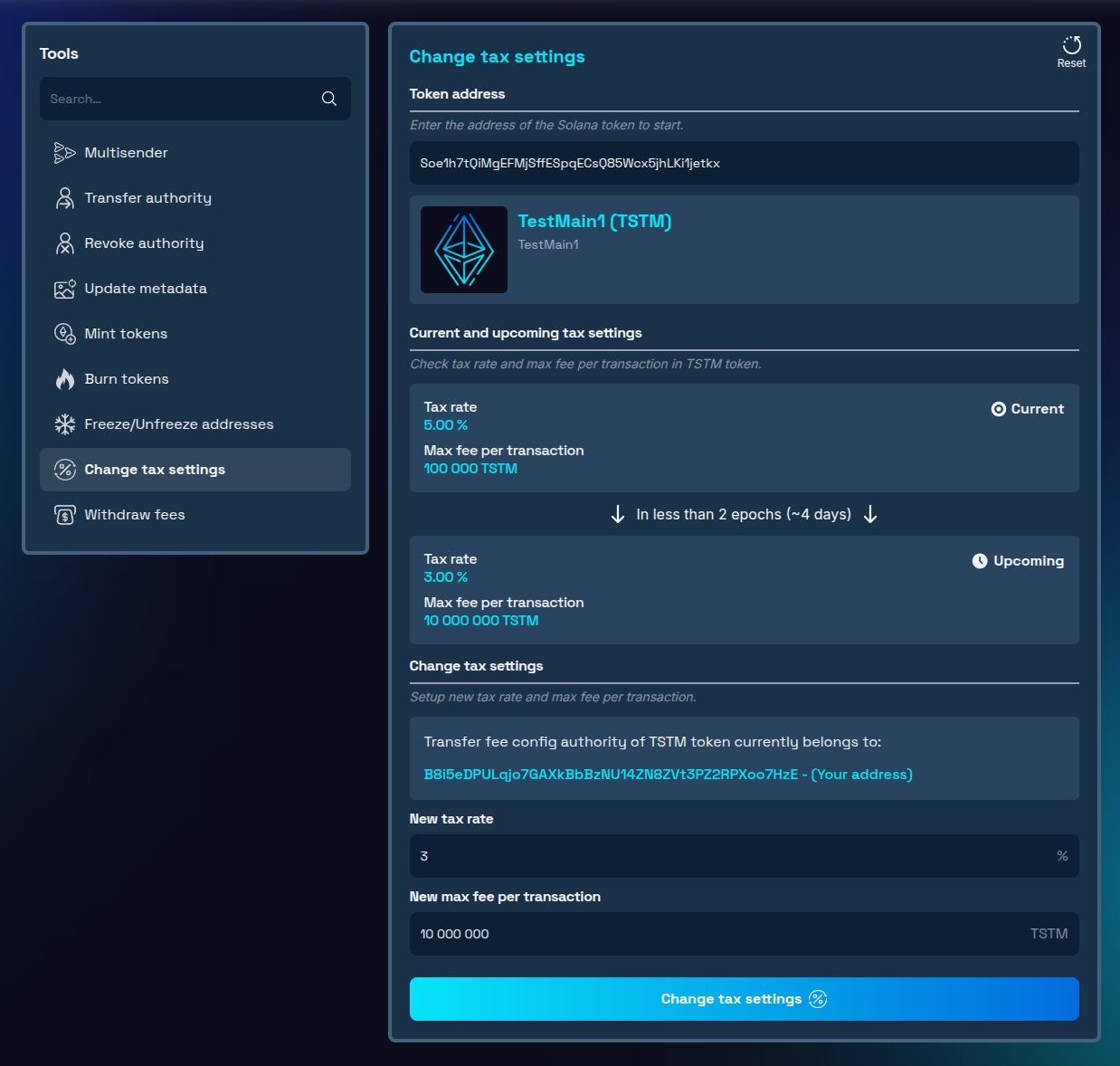
- Clear Status Visibility - the tool clearly displays both current active tax settings and any pending changes that haven't yet taken effect, helping you track the status of your modifications during the mandatory 2-epoch delay period on Solana blockchain.
How to Edit Solana Tax Rate Using 20lab's Tool
The 20lab's Solana tax config tool provides a straightforward interface for authorized users to modify tax parameters. Here's a step-by-step guide to changing your token's transfer tax settings.
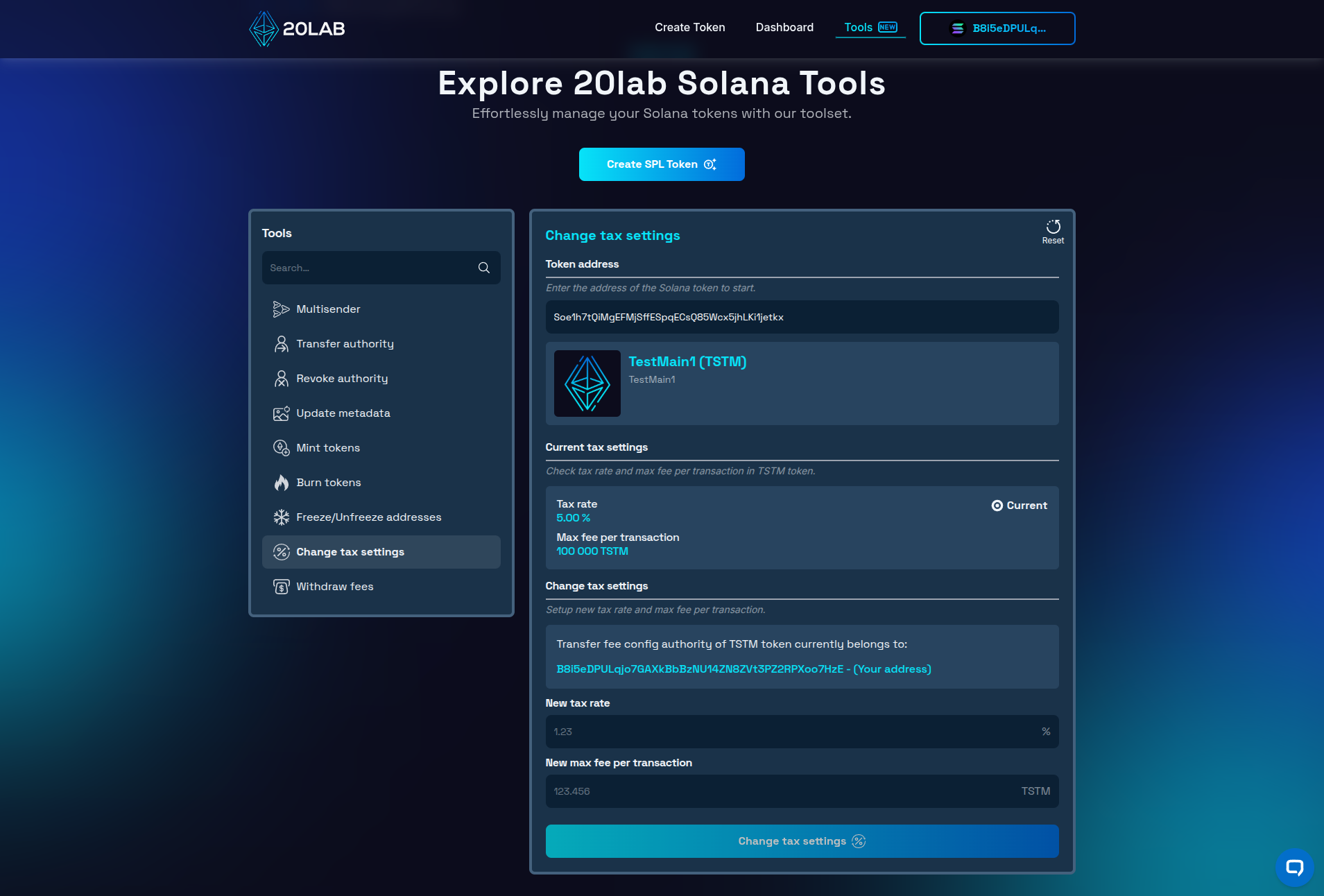
- Connect Your Authority Wallet: Access the 20lab's tax config tool and connect the wallet that holds the transfer fee config authority permissions for your token.
- Enter Your Token's Address: Input your token's mint address in the designated field to load the current tax configuration data. You will also see the current authority holder, if it matches your connected address, you can continue modifying tax parameters.
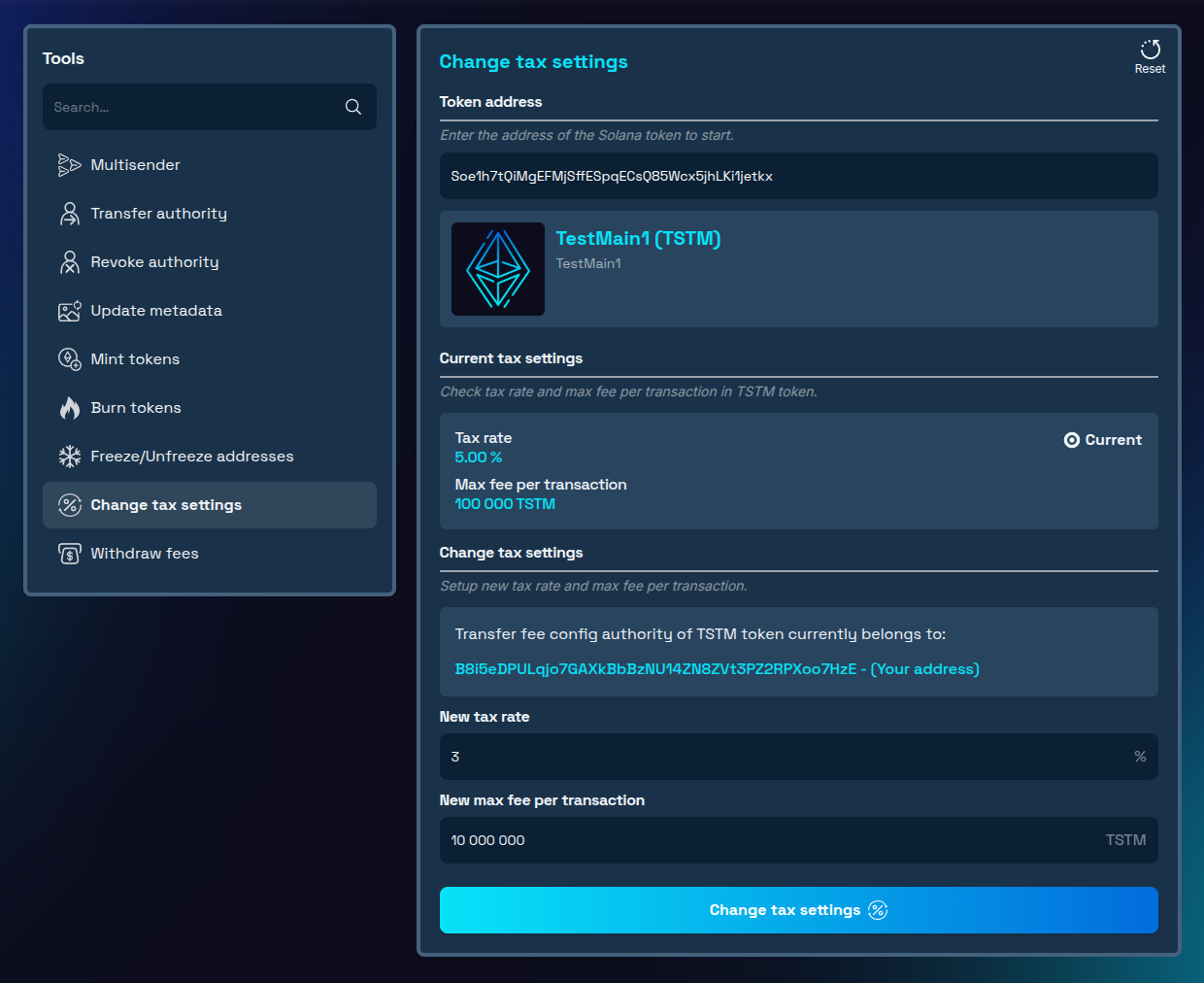
- Configure New Parameters: Input your desired new values for:
- New tax rate: The percentage of each transaction collected as a fee
- New max fee per transaction: The cap on the maximum amount that can be collected per transaction. To disable the max fee limit, set it to your token's total supply.
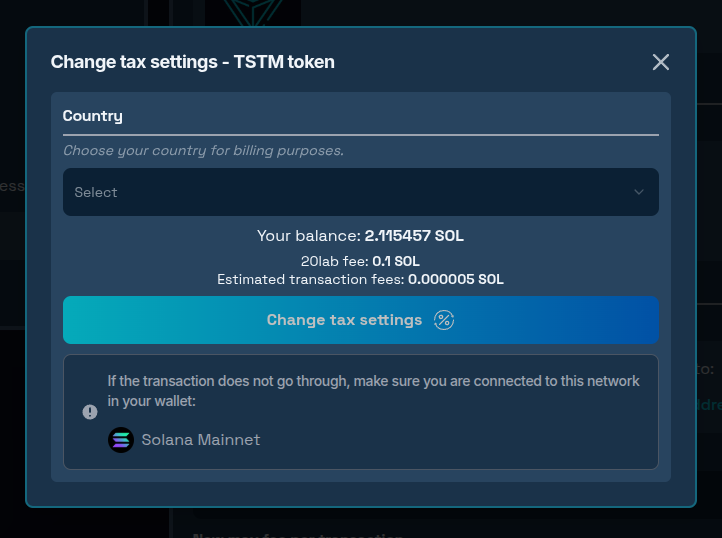
- Confirm and Submit the Transaction: Review your changes, then confirm the transaction to submit the update to the blockchain.
- Wait for Activation: Remember that your changes won't take effect immediately. There is a mandatory 2-epoch delay (approximately 4 days) before new tax settings become active, as mandated by the Solana Token-2022 program. You can track the moment when the changes will take effect directly in the tool interface.
Best Practices and Common Mistakes When Managing Solana Tax Settings
When adjusting your SPL token's tax parameters, keep these key considerations in mind:
Avoid These Common Pitfalls:
- Setting fees too high: Excessive fees reduce trading activity, decrease liquidity, and create competitive disadvantages.
- Ignoring the activation delay: Always account for the 2-epoch waiting period in your planning and communications.
- Poor communication: Announce changes before implementation with clear explanations for the adjustments.
Follow These Best Practices:
- Find balance: Seek the optimal point between revenue generation and maintaining active token usage.
- Make gradual changes: Implement incremental adjustments rather than dramatic fee increases.
- Establish clear policies: Define when and how fee adjustments will be considered.
- Consider decentralizing control: As your project matures, transfer authority to multisig wallets or governance programs to increase community trust.
Thoughtful tax management strengthens your token ecosystem while maintaining holder confidence.
Conclusion
The ability to adjust transfer tax parameters provides Solana token creators with powerful flexibility to adapt their tokenomics over time. Used wisely, this capability can help projects respond to changing market conditions, fund ongoing development, and implement sophisticated token economic strategies.
Remember that while the technical process of changing fees is straightforward with tools like 20lab's tax config utility, the strategic considerations should take precedence. Every fee adjustment impacts your community, trading activity, and token perception.
By following the guidelines in this post and maintaining transparent communication with your community, you can implement transfer fee changes that support your project's goals while maintaining holder confidence and ecosystem health.
If you have questions about using Solana tools, don't hesitate to reach out to us via our Telegram channel.


