
For token creators on Solana, transfer fees represent a valuable revenue stream that can support ongoing development, fund operations, or implement tokenomics strategies like buyback and burn. With the growing adoption of SPL tokens with transfer tax, effectively managing and collecting these fees has become essential for sustainable project growth. This guide will walk you through the process of collecting these fees using 20lab's specialized tax withdraw tool.
Understanding the SPL Token Transfer Fee Mechanism
Before diving into the collection process, it's important to understand how transfer tax work in the Token-2022 program:
- Transfer fees are automatically collected during token transfers based on your token's fee configuration
- Fees are not sent to a central account but remain as "withheld amounts" in each recipient's Associated Token Account (ATA)
- These withheld amounts are visible on-chain but cannot be used by the token holder
- Only the designated transfer fee withdraw authority can collect these accumulated fees
This decentralized approach to fee storage reduces transaction overhead during normal transfers while still ensuring fees can be efficiently collected when needed.
Who Can Withdraw Accumulated Transfer Fees
Access to fee withdrawal is strictly controlled. Only the current transfer fee withdraw authority can collect accumulated fees, which typically includes:
- The original token creator who deployed the token,
- Any wallet address that has been transferred the withdraw authority,
- A multisig wallet if the withdraw authority has been transferred to one,
- A governance program if fee withdrawal control has been delegated to it.
If the transfer fee withdraw authority has been revoked (set to null) or transferred to an inaccessible address, collected fees cannot be withdrawn. This creates a permanent "black hole" where fees accumulate but can never be accessed, effectively functioning as an auto-burn mechanism.
Why 20lab's Solana Tax Withdraw Tool Stands Out
What makes 20lab's tax withdraw tool essential for your Solana token? The platform offers several unique advantages that set it apart from other solutions:
- Efficient Fee Calculation - the tool quickly calculates all pending fees across ATAs and mint addresses, giving you a complete picture of collectible revenue.
- Authority Status Display - the tool automatically identifies and displays the current transfer fee withdraw authority holder, providing immediate verification of your permissions before you attempt any fee withdrawals.
- Unified Token Management - the tax withdraw tool is part of 20lab's comprehensive token management suite, allowing seamless integration with other functions like authority transfers, SPL token creation, and configuration updates.
- User-Friendly Design - the intuitive interface guides you through each step of the process, making fee withdrawal accessible to both technical and non-technical team members.
- Batch Processing - the tool automatically processes accounts with the largest withheld fee amounts first in efficient batches, maximizing collection while minimizing transaction costs.
This combination of features makes the tax withdraw tool not just a convenience but a critical component of effective token management for projects utilizing transfer fees.
Detailed Walkthrough: Using 20lab's Tax Withdraw Tool
Let's look more closely at the process of collecting your token's accumulated fees using 20lab's tax withdraw tool:
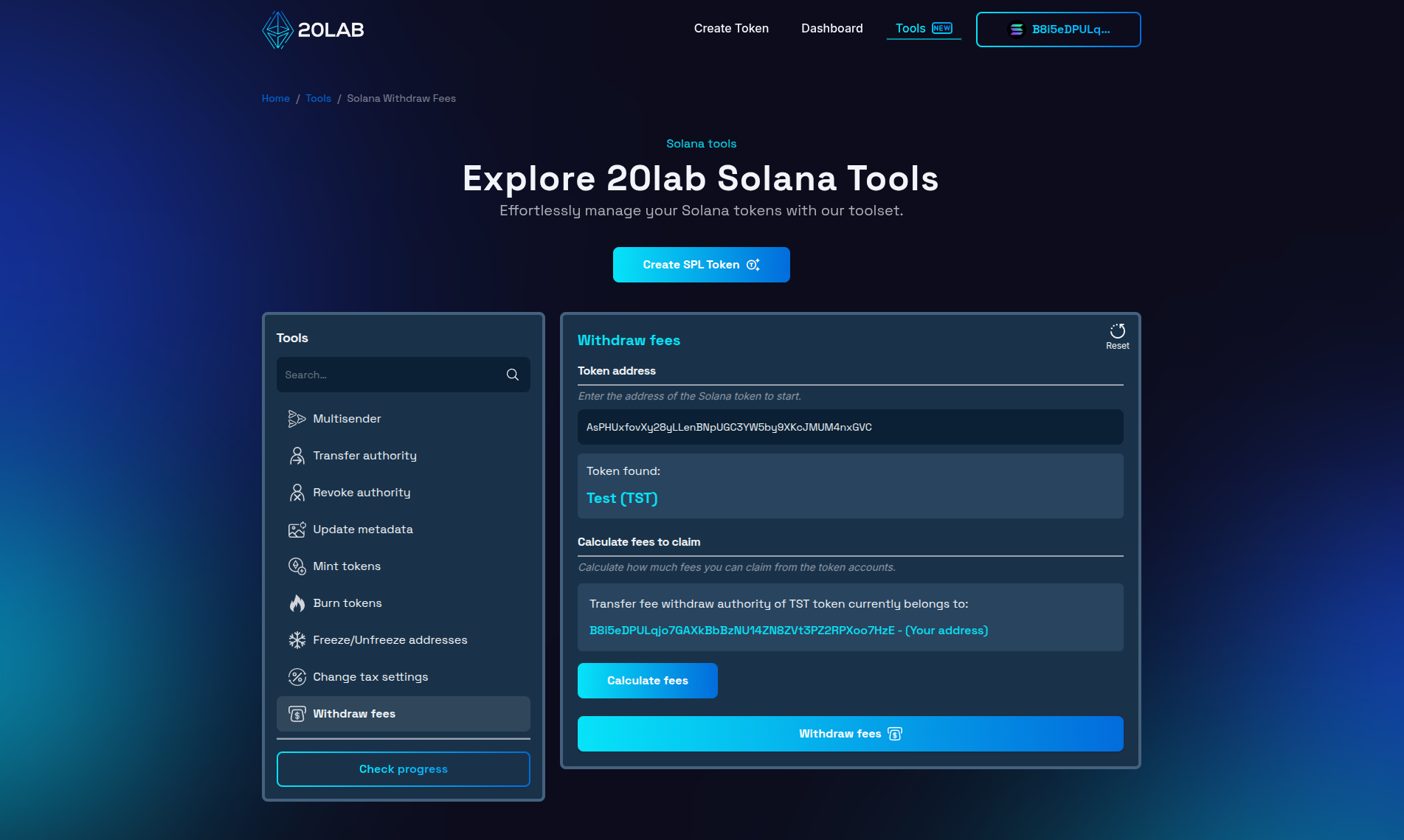
- Connect Your Authority Wallet: Launch 20lab's Solana tax withdraw tool and connect the wallet that holds the transfer fee withdraw authority permissions for your token.
- Enter Your Token's Address: Input your token's mint address in the designated field to see the aforementioned authority holder. If it matches your connected wallet address you can continue to the next step.
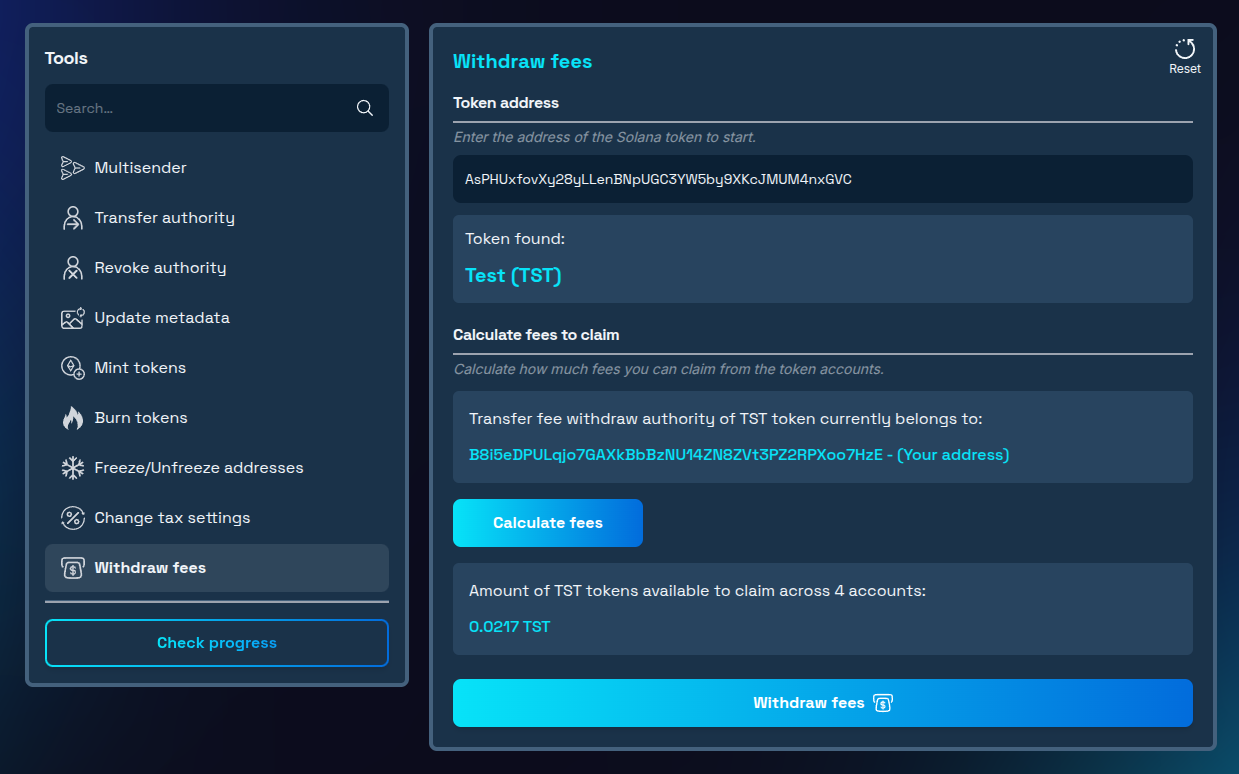
- Review Available Fees: After clicking on the "Calculate fees" button, the tool will automatically scan all accounts holding your token to identify withheld fees. The interface will display the total amount of fees available for withdrawal across all user accounts. This gives you a clear picture of the revenue your token has generated.
- Initiate the Withdrawal Process: Click the "Withdraw fees" button to start the collection process. The tool will automatically identify accounts with the largest withheld fee amounts and sort them to save on gas fees. Also, you will see how many batch transactions are required to be confirmed to fit in the Solana transaction size limit.
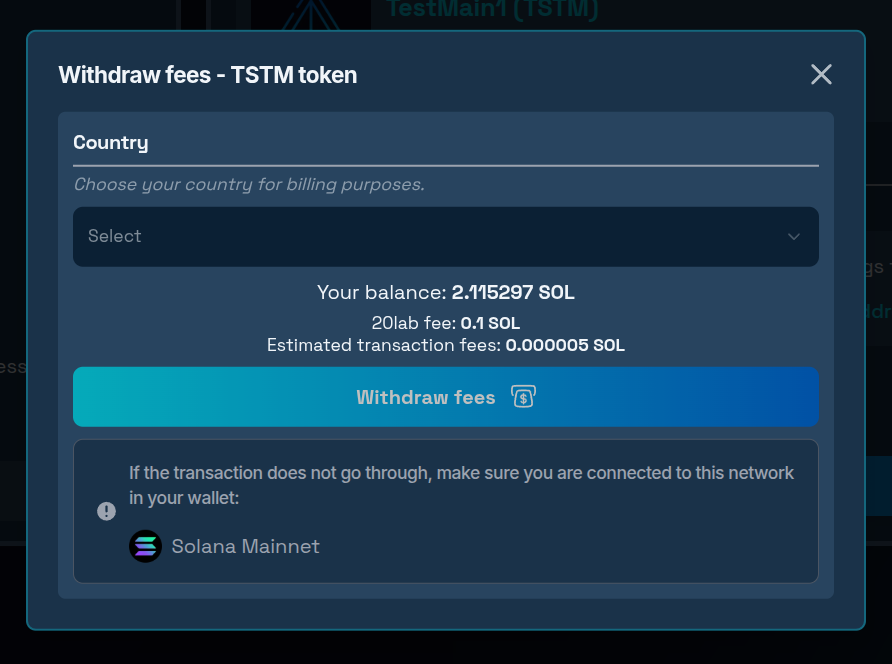
- Confirm the Transaction: Review the information on the final step and confirm the transaction.
- Receive Collected Fees: Once confirmed, the withheld fees will be transferred directly to your connected wallet. If withdrawing fees requires confirming more than one transaction, you can easily confirm all of them in the transaction tracking interface.
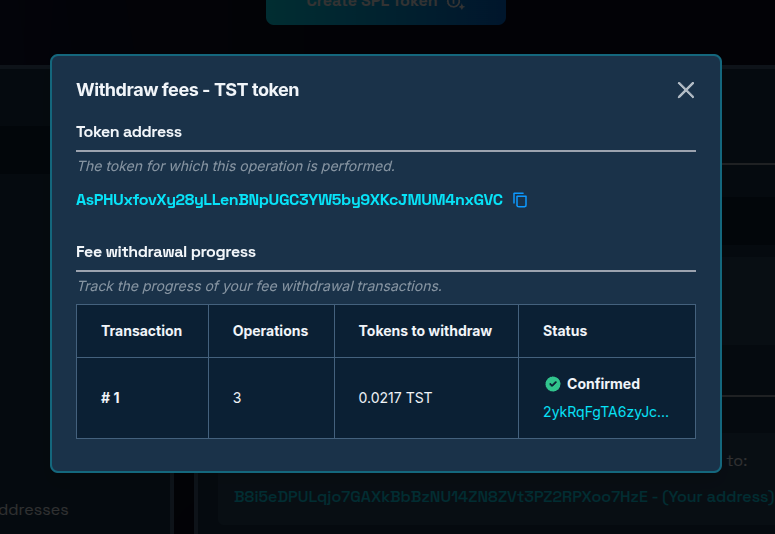
This streamlined process eliminates the complexity that would otherwise be involved in manually identifying and processing accounts with withheld fees, making regular fee collection practical and efficient.
Bonus: Creating a Burn Mechanism with Transfer Fees
If you want to implement a token burn strategy using collected fees, you have two options:
Manual Burn Process:
- First withdraw the fees to your wallet using the tax withdraw tool.
- Then use the 20lab's Solana burn tokens tool to permanently remove the tokens from circulation.
- Both steps can be performed in quick succession.
- For complete transparency, you can announce burns in advance and provide transaction signatures.
Permanent Auto-Burn Setup:
- Revoke the transfer fee withdraw authority completely.
- This creates a permanent black hole where fees accumulate but can never be withdrawn.
- Every transaction will automatically reduce circulating supply, however it won't be reflected as total supply decreases.
- While effective, this approach is irreversible and less flexible than manual burns.
Conclusion
The ability to collect transfer fees provides token creators with a powerful mechanism for sustainable project funding. By understanding how to properly configure, monitor, and withdraw these fees, you can implement sophisticated tokenomics strategies that benefit both your project and its community.
Whether you're using fees for operational expenses, community rewards, or supply reduction through burns, 20lab's tax withdraw tool simplifies the process of accessing this important revenue stream.
Remember that transparency in how you collect and utilize fees is crucial for maintaining community trust and support. By clearly communicating your fee policies and their benefits to the ecosystem, you can turn a simple revenue mechanism into a powerful driver of token value and project sustainability.
Don't leave your project's revenue uncollected – start using 20lab's tax withdraw tool today to transform your token's transfer fees into actionable resources for growth and community development. If you have questions about using Solana tools, don't hesitate to reach out to us via our Telegram channel.


