
Impact of PancakeSwap on Your Token's Success
To add liquidity to PancakeSwap, you first need a liquidity pool - without one, your token exists but can't be traded. It requires establishing a robust, liquid market where traders can confidently buy and sell your token. PancakeSwap has emerged as a cornerstone of the decentralized finance ecosystem, processing billions in daily trading volume and serving millions of users worldwide.
Originally launched on BNB Smart Chain (BSC) where it quickly became the dominant decentralized exchange (DEX), PancakeSwap has now expanded its reach across multiple blockchains including Ethereum, Linea, and other major networks. This multi-chain presence offers token creators unprecedented flexibility in choosing their launch platform while maintaining access to PancakeSwap's substantial user base and battle-tested infrastructure.
This comprehensive guide will walk you through the process of adding initial liquidity to PancakeSwap V2 using 20lab's tools, covering essential security considerations and proven launch strategies that can help your token achieve sustainable success in today's competitive market.
PancakeSwap V2 vs. V3
Understanding the differences between PancakeSwap V2 and V3 is crucial for choosing the right version for your token launch:
PancakeSwap V2
- Liquidity Management: Uses a simple constant product formula
(x * y = k). - Capital Efficiency: Liquidity is distributed evenly across all price ranges.
- Token Compatibility: Supports tokens with transfer fees, reflection mechanisms, and other custom features.
- Setup Complexity: Simple and straightforward pool creation process.
- Risk Management: More predictable for new projects due to uniform liquidity distribution.
- Fee Structure: Fixed 0.25% fee per trade.
PancakeSwap V3
- Liquidity Management: Uses concentrated liquidity with customizable price ranges.
- Capital Efficiency: Up to 4000x more efficient when liquidity is properly concentrated.
- Token Compatibility: No support for tokens with transfer fees.
- Setup Complexity: Requires careful planning of price ranges and fee tiers.
- Risk Management: Higher complexity due to active position management needs.
- Fee Structure: Flexible with options for 0.01%, 0.05%, 0.3%, and 1% fees.
Why is V2 Often Preferred for Token Launch?
Despite V3's advanced features, PancakeSwap V2 remains a popular choice for token launches due to its proven reliability and straightforward approach. Here's why V2 continues to be the go-to choice for many projects:
Robust Compatibility
PancakeSwap V2 offers full support for tokens with taxes or reflection mechanisms, making it ideal for projects with complex tokenomics. The simple pool creation process works seamlessly with virtually any ERC-20 token, regardless of its specific features. Additionally, the platform benefits from widespread integration with trading tools and analytics platforms, providing comprehensive market visibility and trading options.
Predictable Mechanics
At its core, V2 uses the proven constant product formula, ensuring reliable and predictable trading behavior. Liquidity is evenly distributed across all price ranges, creating a stable trading environment for both buyers and sellers. The platform maintains a straightforward fee structure of 0.25% per trade, making it easy for projects to calculate costs and potential returns.
User Experience
Traders and investors benefit from a familiar interface that reduces the learning curve for new participants. The platform offers significantly lower gas fees compared to Ethereum-based alternatives, making it more accessible for retail traders. Furthermore, PancakeSwap boasts an active trading community and established market presence, providing natural visibility for new projects.
How to Add Liquidity to PancakeSwap V2 - Step by Step
Getting Started with PancakeSwap V2 Liquidity
Before adding liquidity, you'll need to ensure you have everything prepared:
- Your token contract address and a sufficient amount of your token in your wallet
- BNB (or another token) to pair with your token inside the liquidity pool
- Enough funds to cover gas fees
If you've created your token using 20lab's token generator, your path forward depends on how your token was set up:
- PancakeSwap V2 Pre-configured: If you selected PancakeSwap as your default exchange when you created your token, some preparations have already been made - such as creating an empty liquidity pool and connecting it to your token so that it will be recognized correctly. You can add liquidity directly from your token dashboard.
- Manual Setup Required: If you didn't select PancakeSwap when creating your token, or created your token outside of 20lab, you can use the ERC-20 add liquidity tool to create a new pool and manage your liquidity without switching platforms.
Adding Liquidity to PancakeSwap V2 with 20lab's Default Exchange Feature
If you created your token on 20lab and selected PancakeSwap V2 as your default exchange, you have all the foundational setup already in place. This includes an empty liquidity pool created and properly connected to your token contract.
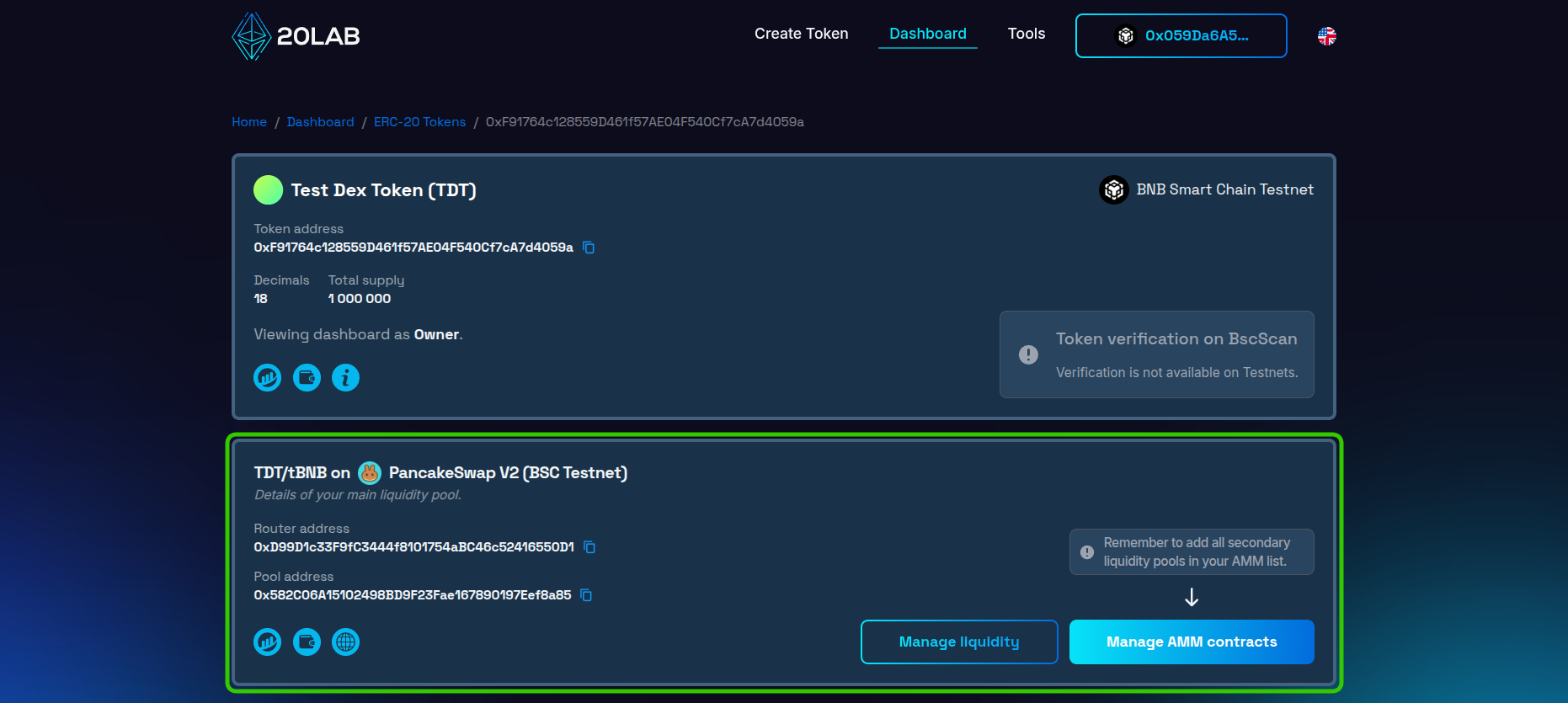
To get started, follow these steps:
- Log into your 20lab owner dashboard.
- Find your token in the list of created tokens.
- Look for the DEX section - it should show your liquidity pool and "PancakeSwap V2".
- Locate the "Manage liquidity" button - after clicking, it will automatically open the tool that allows you to provide liquidity to your main pool or remove it whenever needed.
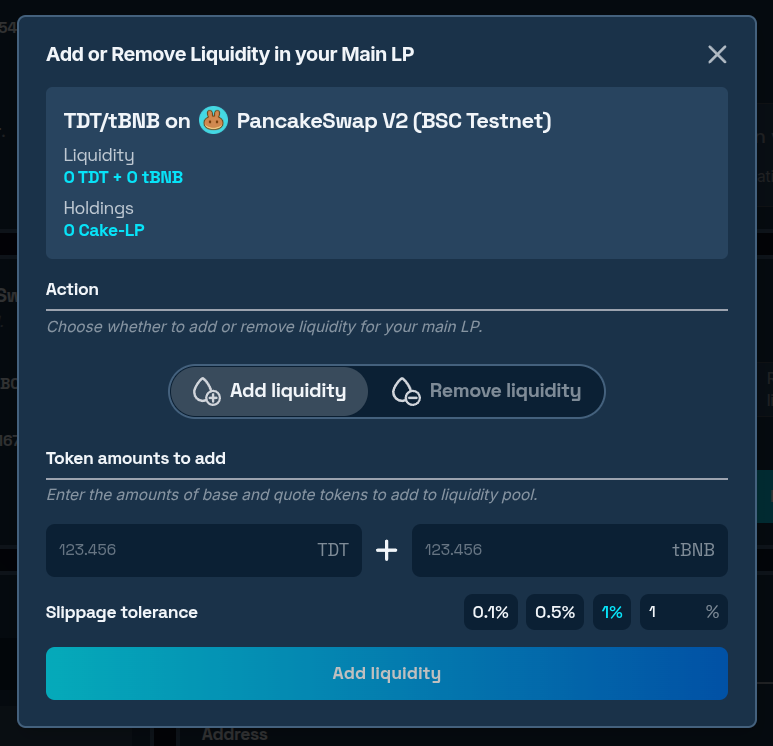
The pool is initially empty with no price assigned. To enable trading of your token, add initial liquidity:
- Input the desired amounts of both your token and BNB that you want to add.
- Sign the approval transaction to allow spending of your token using your wallet.
- Confirm the second transaction, which will add liquidity to the pool.
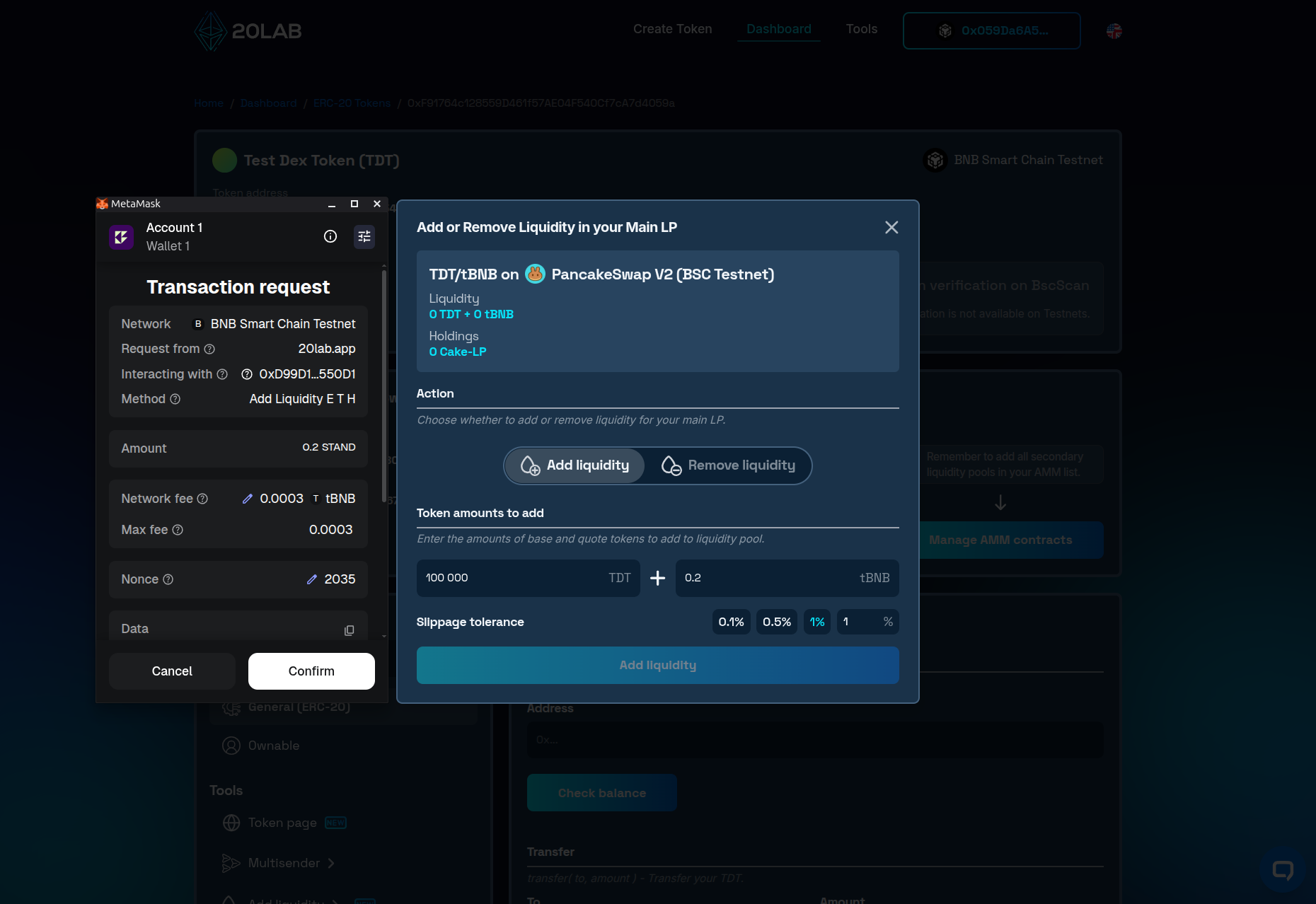
- After all transactions are confirmed, the pool information will update to reflect the added assets and a price will be assigned to your token.
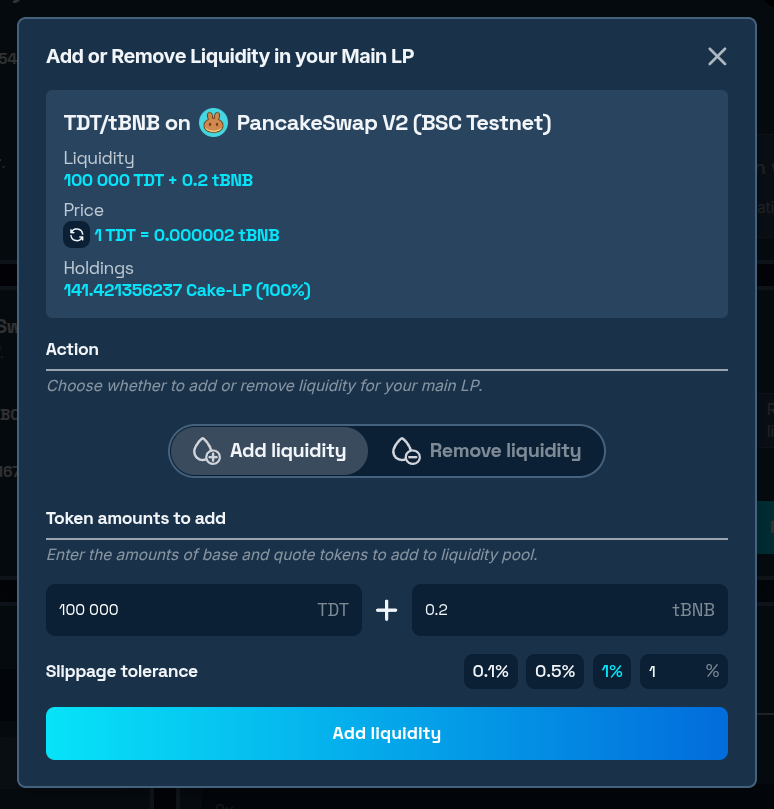
In almost all cases, immediately after liquidity is added to your token, everyone will be able to trade - buy or sell your token on PancakeSwap. If you want to delay the start of trading and don't want to depend on the moment when liquidity is added, you can consider adding the EnableTrading function. This feature adds an owner-restricted function to control when trading should start.
How to Manually Add Liquidity to PancakeSwap Using 20lab's Tool
If you didn't select PancakeSwap as your default exchange or created your token elsewhere, you can use 20lab's add liquidity tool designed specifically for ERC-20 tokens. Here, the base token is the token you are launching, and the quote token is the asset you are pairing it with - most commonly BNB or a stablecoin.
Here's how to do it:
- Visit the ERC-20 add liquidity tool.
- Enter your token's contract address as the base token and your chosen collateral (e.g. BNB) as the quote token.
- Choose the preconfigured DEX, or enter a custom one.
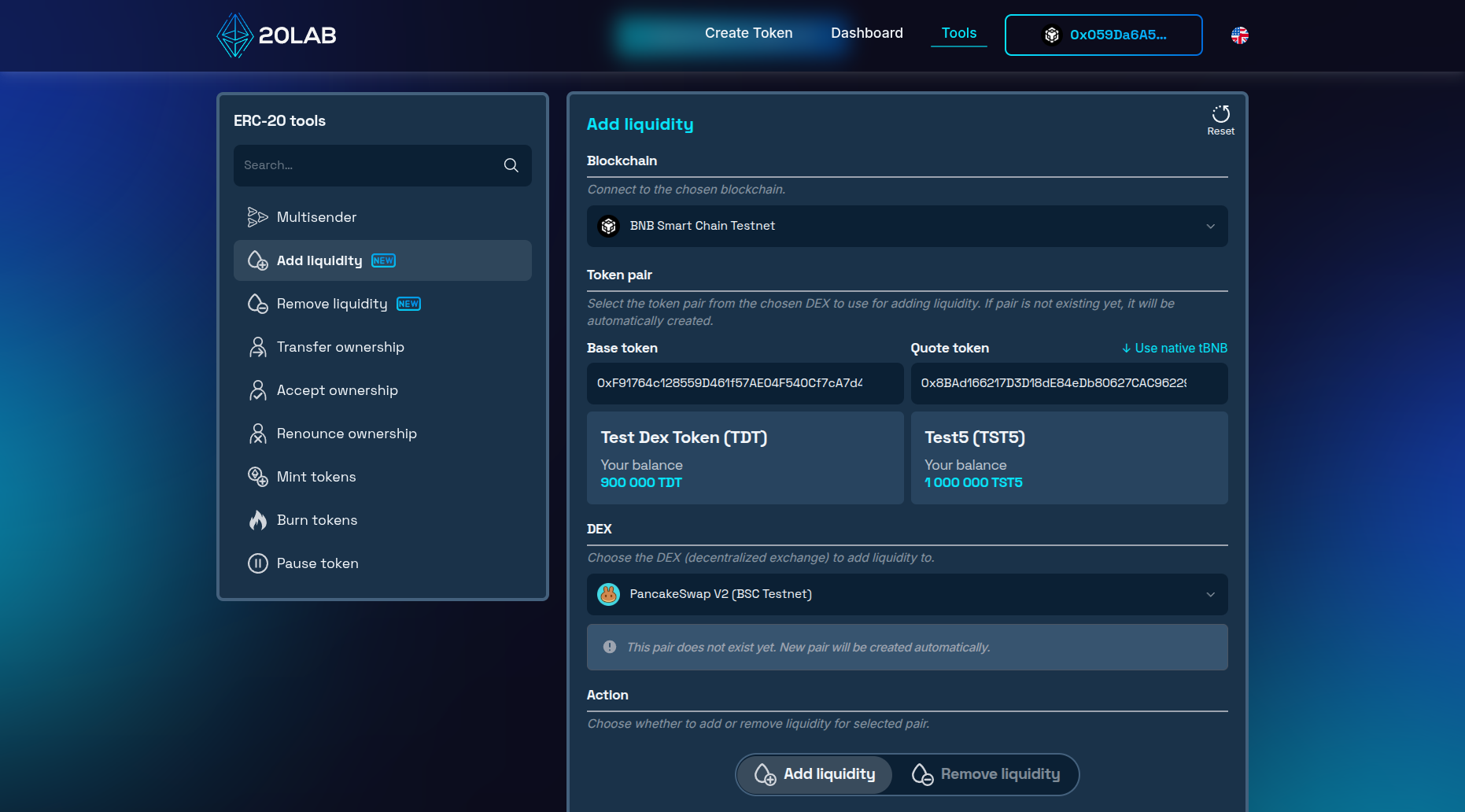
Note: If this is the first time liquidity is being added for this pair, a new pool will be created automatically alongside your initial deposit.
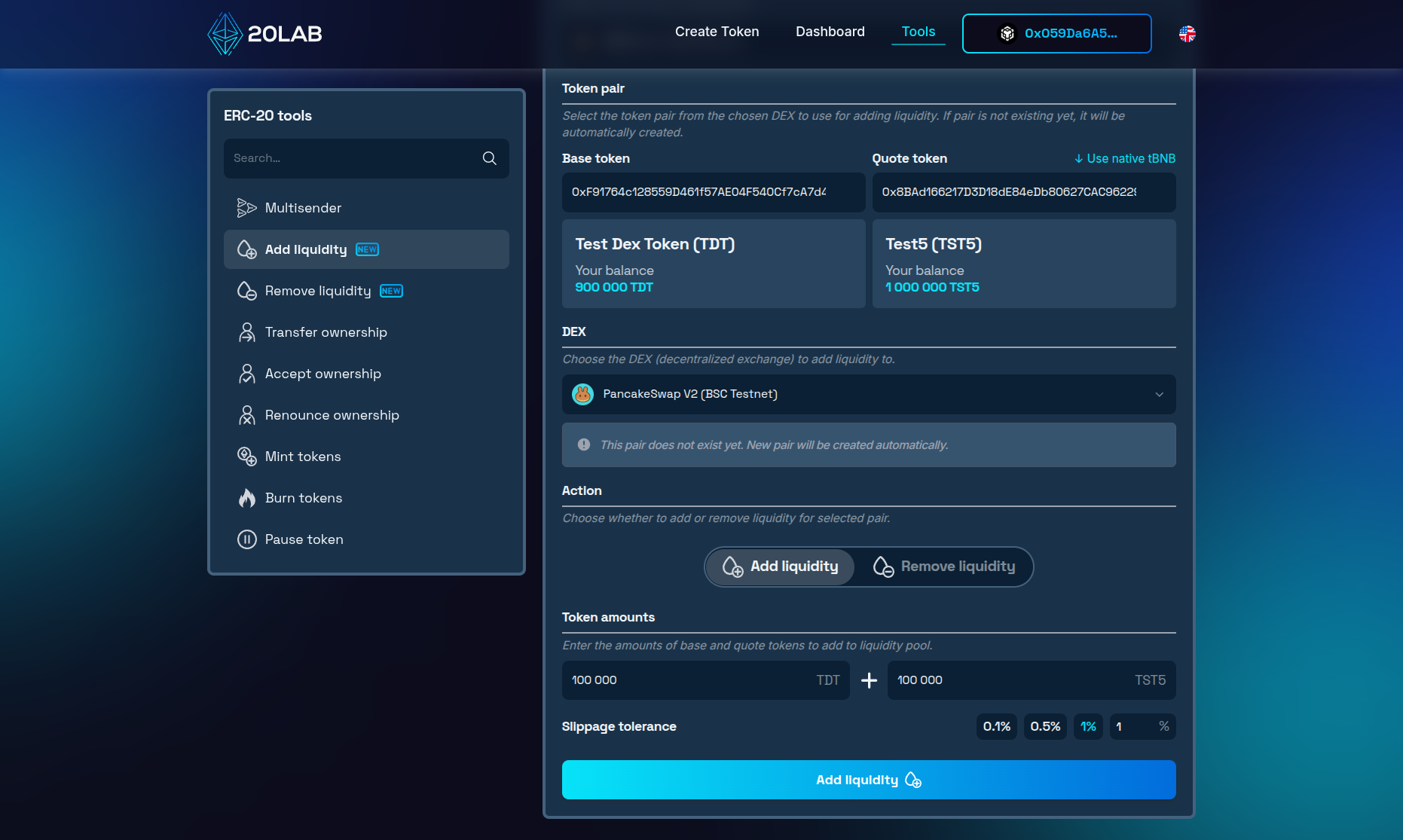
- Enter the desired amount of both tokens to be supplied into the new liquidity pool.
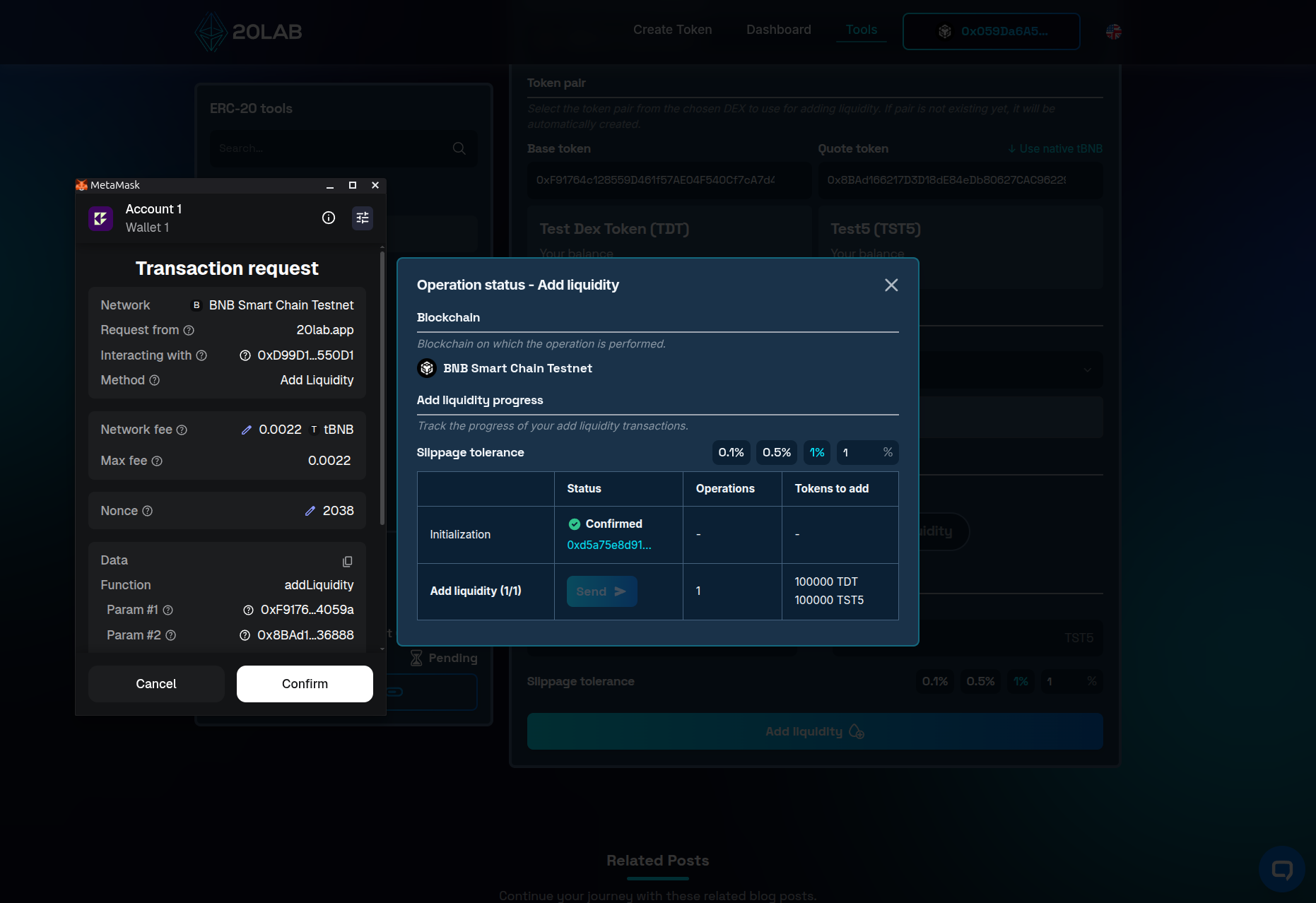
- Confirm all necessary approvals and transactions in your wallet.
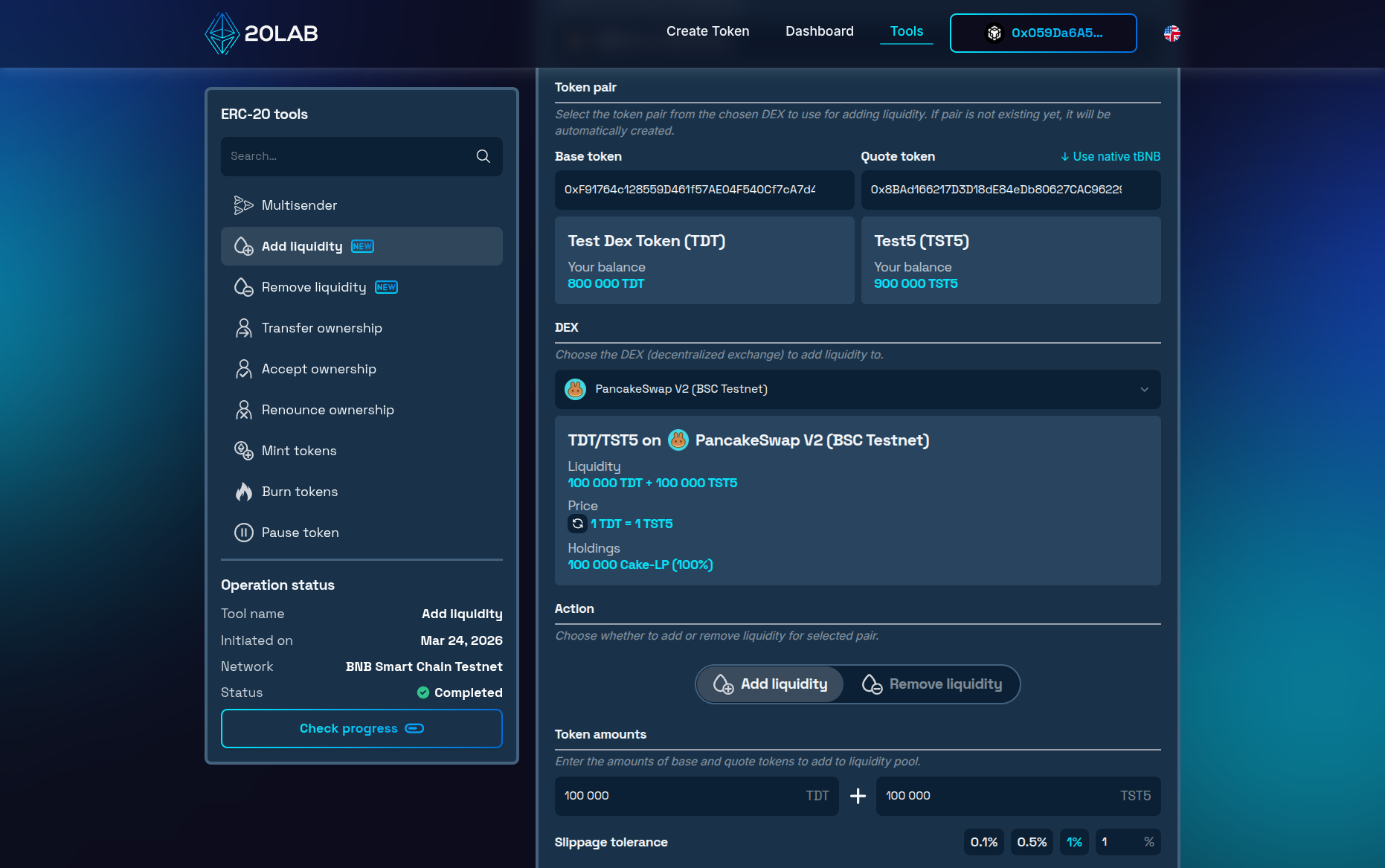
- After the operation is completed, close the window. The pool will now show the correct price and all LP tokens will be owned by your wallet.
Removing Liquidity
It's worth noting that if you will ever need to withdraw your position, the ERC-20 remove liquidity tool is here at your disposal.
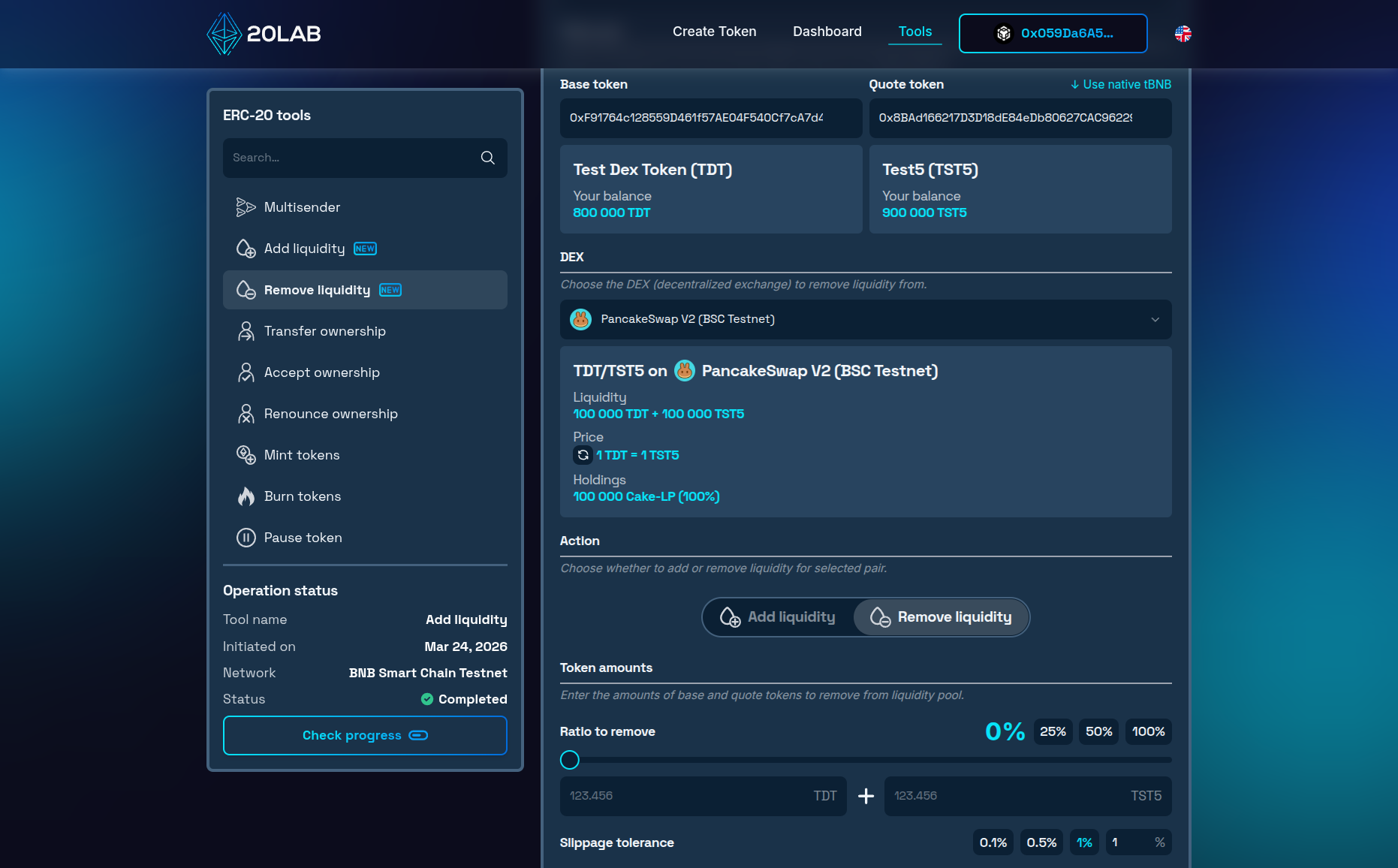
Connect your wallet, select the pool, and choose how much to withdraw - partially or in full. Your LP tokens will be exchanged back for the underlying assets and returned directly to your wallet.
Security and Launch Management
Once liquidity is added, your first move should be securing your LP tokens - leaving them in your wallet signals bad intent to potential investors. You have two options: locking them via a platform like PinkLock or Unicrypt for a set period (at least 6 months), or burning them permanently. Burning is the stronger trust signal, and 20lab's ERC-20 burn tokens tool makes it straightforward - connect your wallet, paste your pair address and burn all the LP tokens to make removing that portion of liquidity impossible.
To protect your launch from malicious actors, you can implement limits such as anti-bot cooldown, max wallet limit or max transaction limits features within your token contract. Other options might include using a blacklist to target malicious actors directly or setting higher sell fees in the first few hours after launch to decrease chances of sniping the pool.
Conclusion
When you add liquidity to PancakeSwap, you turn your token into a real, tradeable market - and with PancakeSwap V2, it's more accessible than it might seem. Its simplicity and broad compatibility, particularly for tokens with transfer fees, make it the right starting point for most token launches. With 20lab's ERC-20 add liquidity and ERC-20 remove liquidity tools, you can manage your positions from start to finish without switching platforms.
For more support with 20lab's token creation and liquidity pools, join our Telegram channel. Our team is here to help you succeed.


