
Impact of Meteora on Your Token's Success
Creating a successful token on Solana goes beyond minting - it demands a reliable liquidity foundation that supports active trading from day one. Meteora has quickly established itself as one of Solana's most innovative liquidity protocols, offering a suite of pool types engineered for both new token launches and long-term market depth.
Unlike traditional DEXes with a one-size-fits-all approach, Meteora is built around flexibility. Its pool types serve different use cases - from straightforward constant-product markets to advanced launch pools with concentrated liquidity. This guide walks you through everything you need to add liquidity to Meteora for the first time, with a clear focus on choosing the right pool type and keeping your launch secure.
Understanding Meteora's Pool Types
Meteora currently offers three main pool types, each designed for a specific use case.
DAMM v1 (Dynamic AMM v1)
DAMM v1 is Meteora's original AMM and remains a proven, battle-tested choice widely used across the Solana ecosystem. It follows the classic x·y=k constant-product model, with liquidity distributed across the full price range from 0 to infinity.
Its standout feature is the dual-yield mechanism: idle liquidity in the pool is automatically deployed to external lending protocols, so LPs earn both swap fees and lending yield simultaneously. That lending yield is auto-compounded back into the pool over time, steadily growing the value of LP positions without any manual action. It supports fixed fee tiers and a custom activation time, but it is compatible only with standard SPL tokens, not with Token-2022.
DAMM v2 (Dynamic AMM v2)
DAMM v2 is a complete rebuild of Meteora's AMM infrastructure - not an upgrade of v1, but an entirely new program designed for modern token launches. Unlike Raydium, Meteora charges no protocol fee for pool creation, so the only cost you pay is Solana rent - creating a pool and position costs approximately 0.022 SOL, making it one of the most affordable ways to launch a liquidity pool on Solana.
On the fee side, you can choose between a fixed base fee or a dynamic fee that adjusts automatically based on market volatility. You can also configure the "Collect fee mode" to receive trading fees in both tokens or in the quote token only - useful if you'd prefer all fee revenue e.g. in SOL.
Speaking of activation - DAMM v2 lets you set a custom start time so your pool goes live exactly when you're ready. Your liquidity position is represented as a Position NFT rather than a traditional LP token, which means fees can be claimed independently from liquidity withdrawal. It's also important to note that both the classic SPL token program and Token-2022 are fully supported.
DLMM (Dynamic Liquidity Market Maker)
DLMM brings concentrated liquidity to Meteora, allowing LPs to allocate funds into discrete price bins rather than spreading liquidity across the entire price range. Swaps occurring within the active bin execute with near-zero slippage, and LPs can choose exactly how their funds are distributed using preset strategies - Spot, Curve, or Bid-Ask.
Fees on DLMM adjust dynamically based on volatility: they rise during turbulent periods to help offset impermanent loss and drop during stable conditions to keep the pool competitive.
The tradeoff is complexity - DLMM positions require active monitoring and regular rebalancing. Pool creation also costs significantly more than DAMM v1 or v2 - around 0.25 SOL for bin arrays and positions.
Why Choose DAMM v2 for Token Launch?
For most new token launches on Solana today, DAMM v2 is the strongest option - and the one covered in this guide.
Its combination of near-zero creation costs, Token-2022 compatibility, and powerful launch-specific features makes it purpose-built for projects enabling trading for the first time. DLMM is a strong choice later down the line, once your token has an established trading history. DAMM v1 is a solid alternative if your token uses the standard SPL format and you don't need Token-2022 support.
For tokens created using 20lab's token generator, DAMM v2 compatibility is fully guaranteed. 20lab ensures your token uses only supported Token-2022 extensions - Transfer Fees, Metadata, or Metadata Pointer — so you can proceed without compatibility concerns.
As with any DEX, if your token has freeze authority enabled, disable it before creating your pool. An active freeze authority will be flagged to traders and can seriously undermine confidence in your project.
Step-by-Step Liquidity Addition Guide
Before you begin the pool creation process, you should gather these essential items:
- Your token address (token mint address)
- Tokens for initial liquidity and SOL for transaction costs
- Quote token (SOL or another token) to pair with your token in the pool
If you created your token on 20lab, you can easily copy the token mint address from the dashboard or access the Solana liquidity pool creation tool directly.
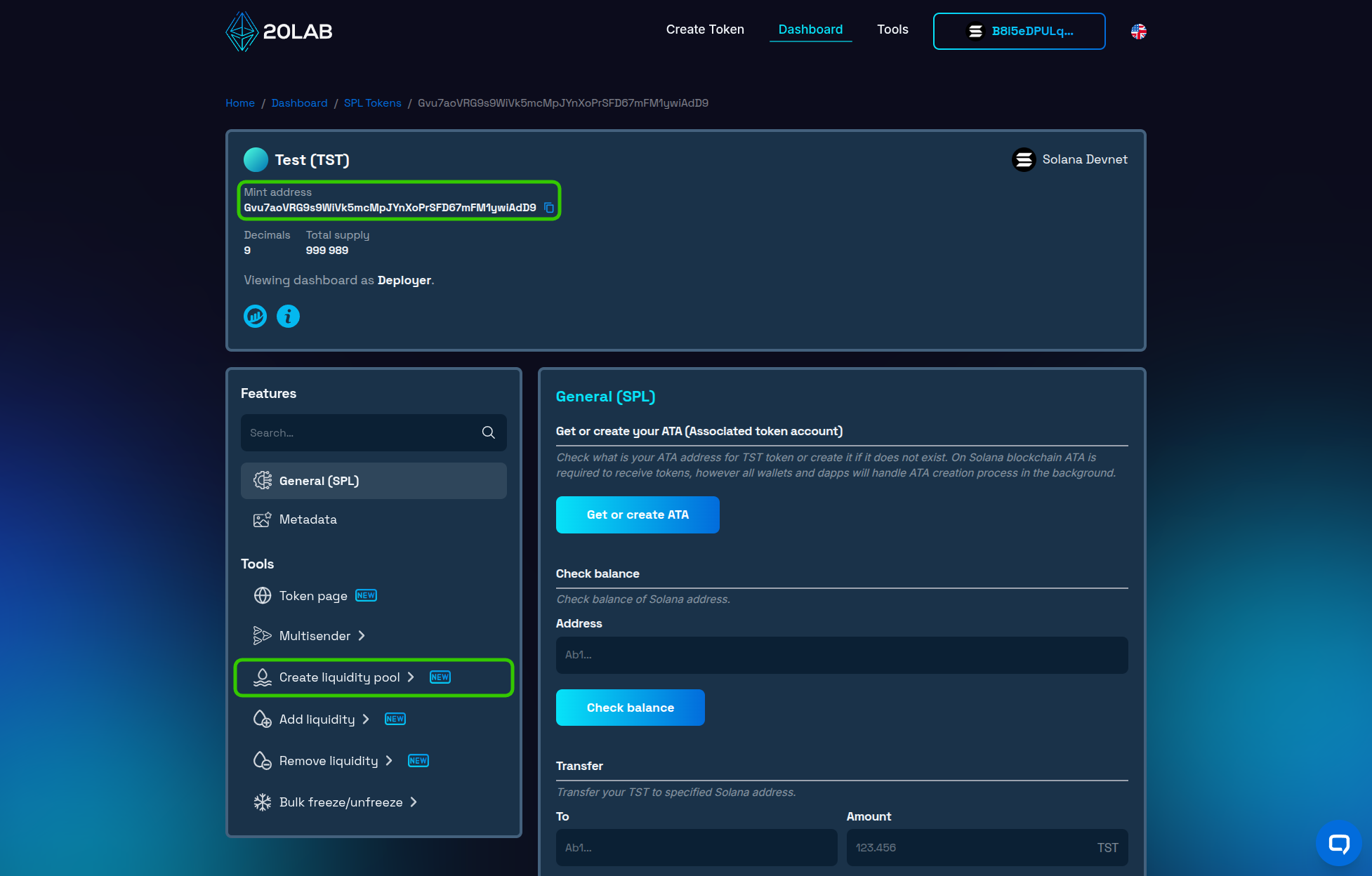
Once you have all of the above ready, here's how to add liquidity to Meteora step by step:
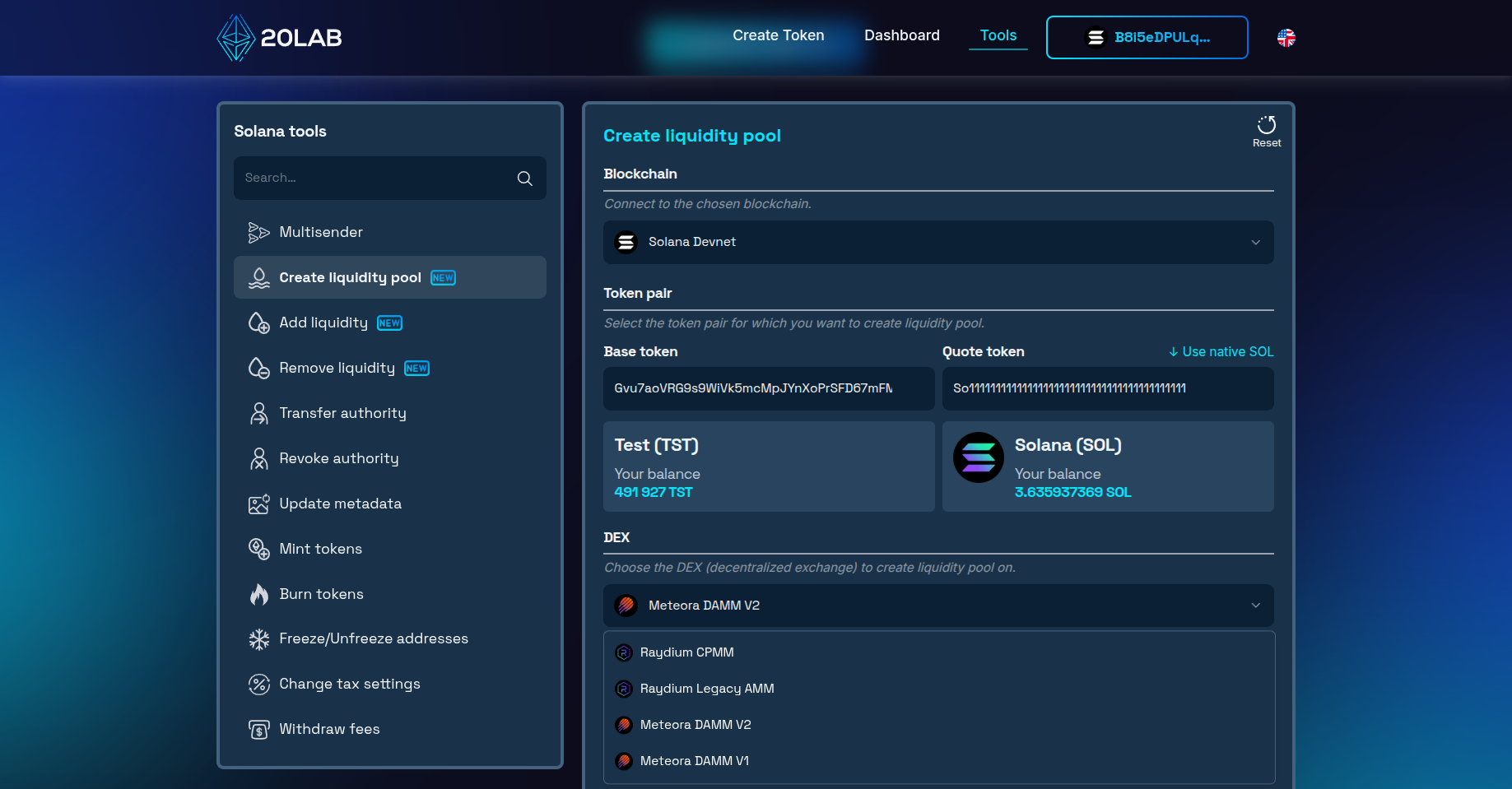
- Navigate to the Solana liquidity pool creation tool.
- Paste your token mint address as the "Base token".
- Paste the quote token mint address or select native SOL.
- Choose Meteora DAMM v2 as your pool type. If you prefer to use DAMM v1, this option is also supported.
- Select your preferred fee tier. You can also enable dynamic fees, which let the pool automatically adjust fees based on market volatility. Recommended base rates are 0.25% for higher-volume pairs and 1% for newer or lower-volume tokens.
- Configure the collect fee mode - choose whether trading fees are collected in both tokens or in the quote token only. Collecting in SOL only can simplify things, especially early on.
- Enter the amounts of base and quote tokens to add to the pool. The ratio between the two tokens determines the initial price of your token, so double-check this before proceeding.
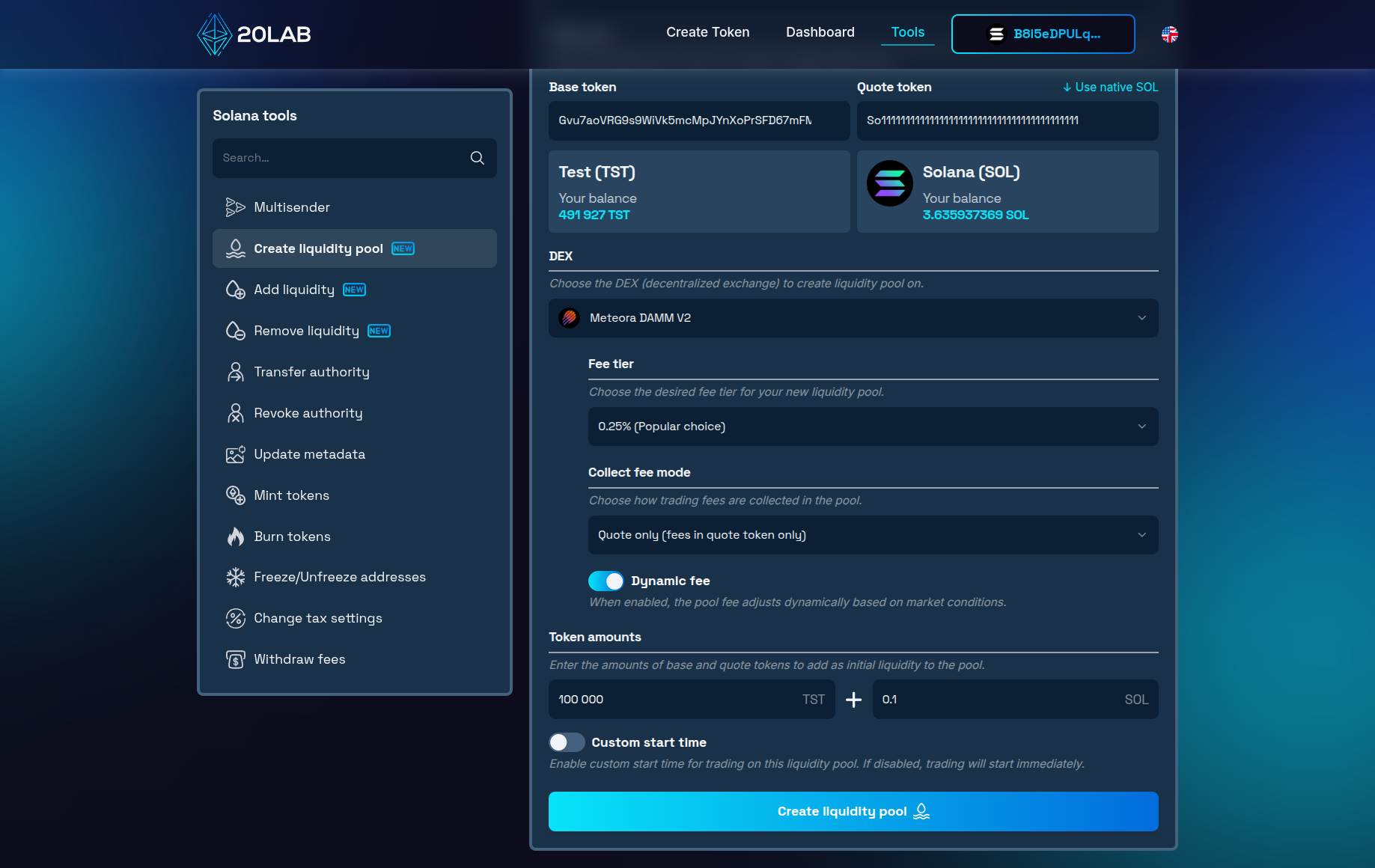
- Optionally, set a custom start time for the pool or launch it immediately. This gives you control over when trading becomes active - useful if you want to coordinate the launch with an announcement or community event.
Take your time to carefully review all parameters before confirming. Make sure your wallet has sufficient funds to cover both the liquidity amounts and fees, then confirm transactions.
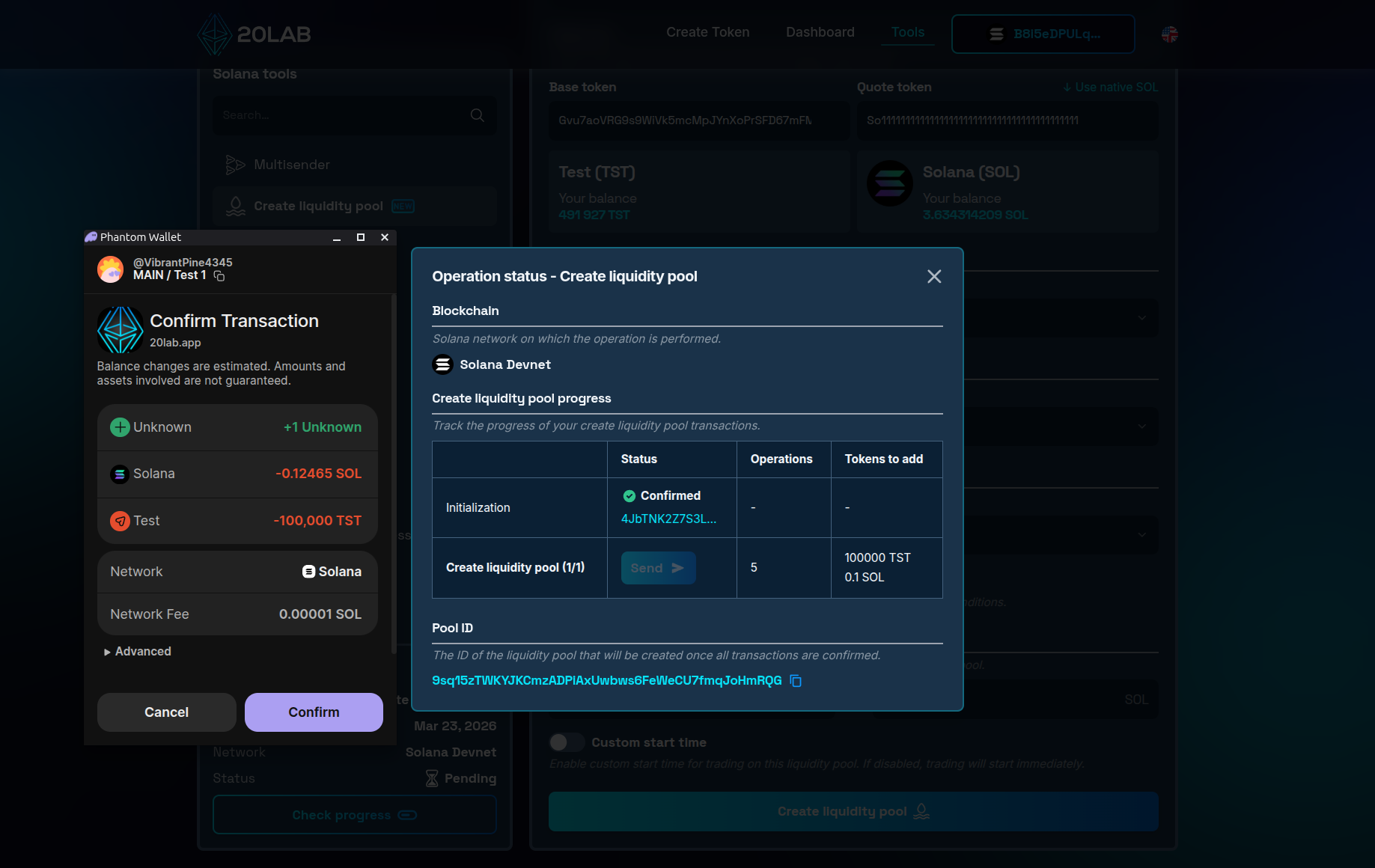
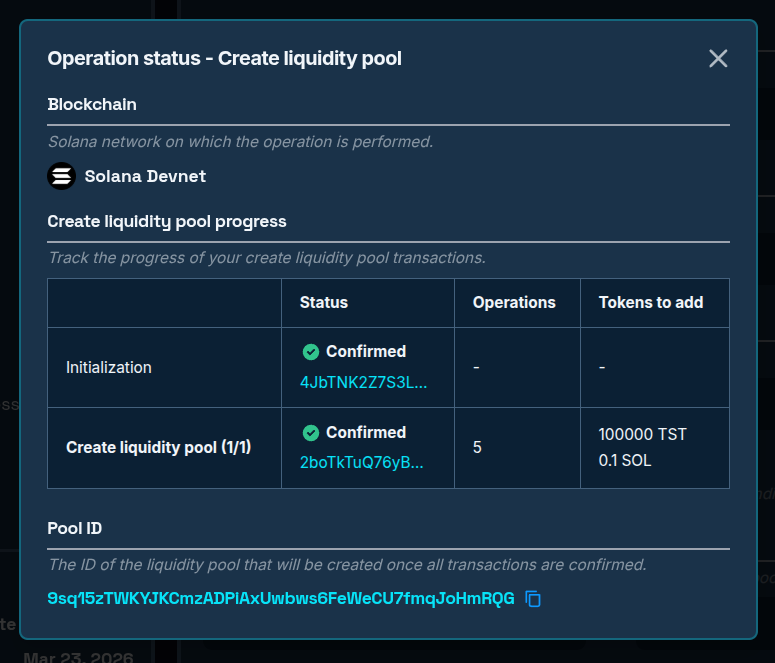
Once all transactions are confirmed, your pool will be live and accessible under its automatically assigned pool ID, which you can copy directly from the operation status window.
Launch Management and Security
Getting your pool live is just the beginning. From here, you'll want to keep your liquidity healthy, track how your token is trading, and secure your position in a way that builds lasting trust with your community. 20lab's tools cover all of this in one place - no jumping between platforms.
Adding Liquidity
Thin liquidity means higher price impact for buyers, which can discourage trading and hurt your token's reputation early on. As interest in your project grows, adding more liquidity to the pool is a straightforward way to keep the market smooth and attractive. You can do this at any time using 20lab's Add Liquidity tool.
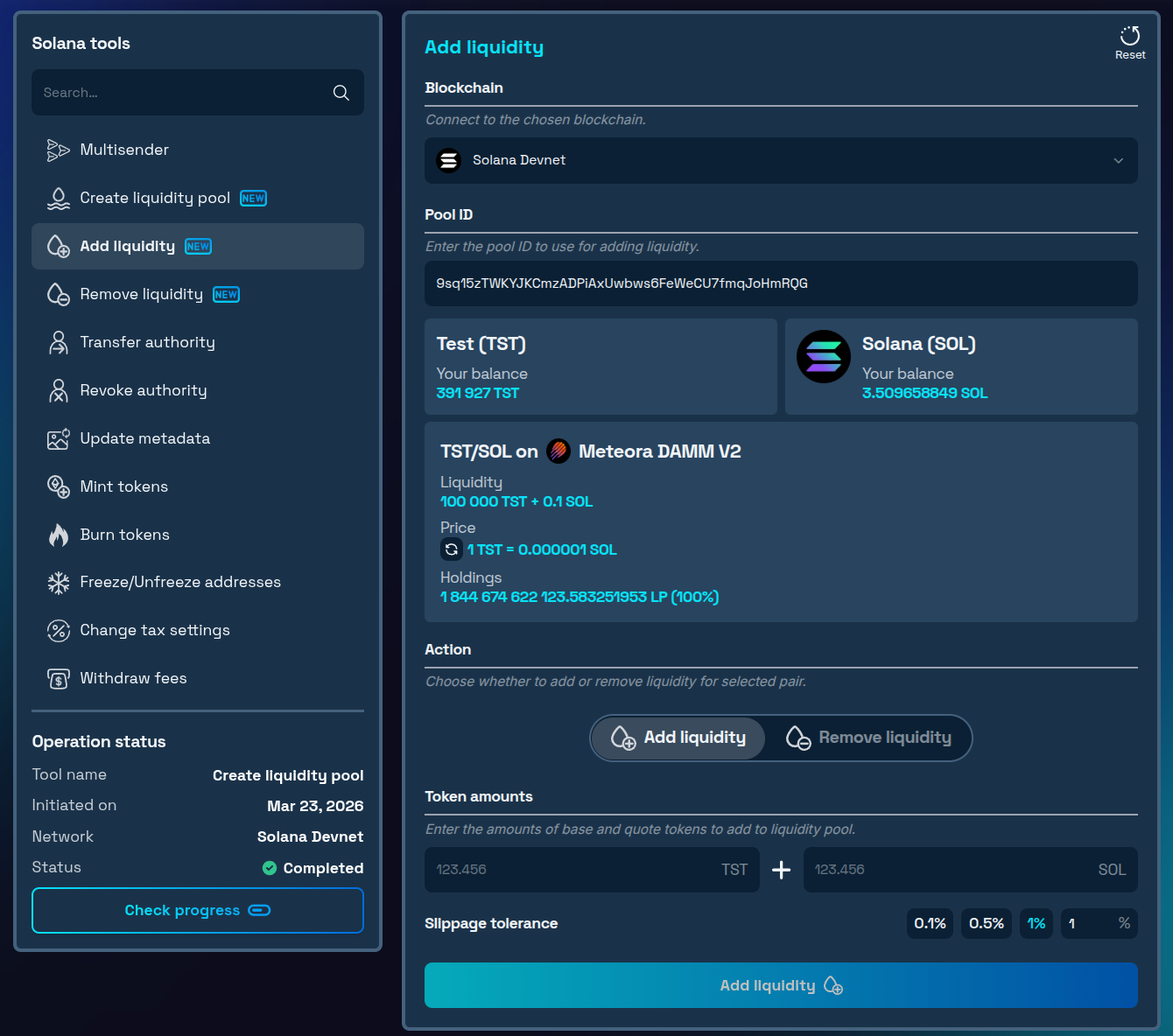
Paste your pool ID, enter the amounts, and confirm - your position is updated without ever leaving 20lab.
Removing Liquidity
Need to reduce your position? 20lab's Remove Liquidity tool lets you withdraw any portion of your liquidity that hasn't been locked or burned.
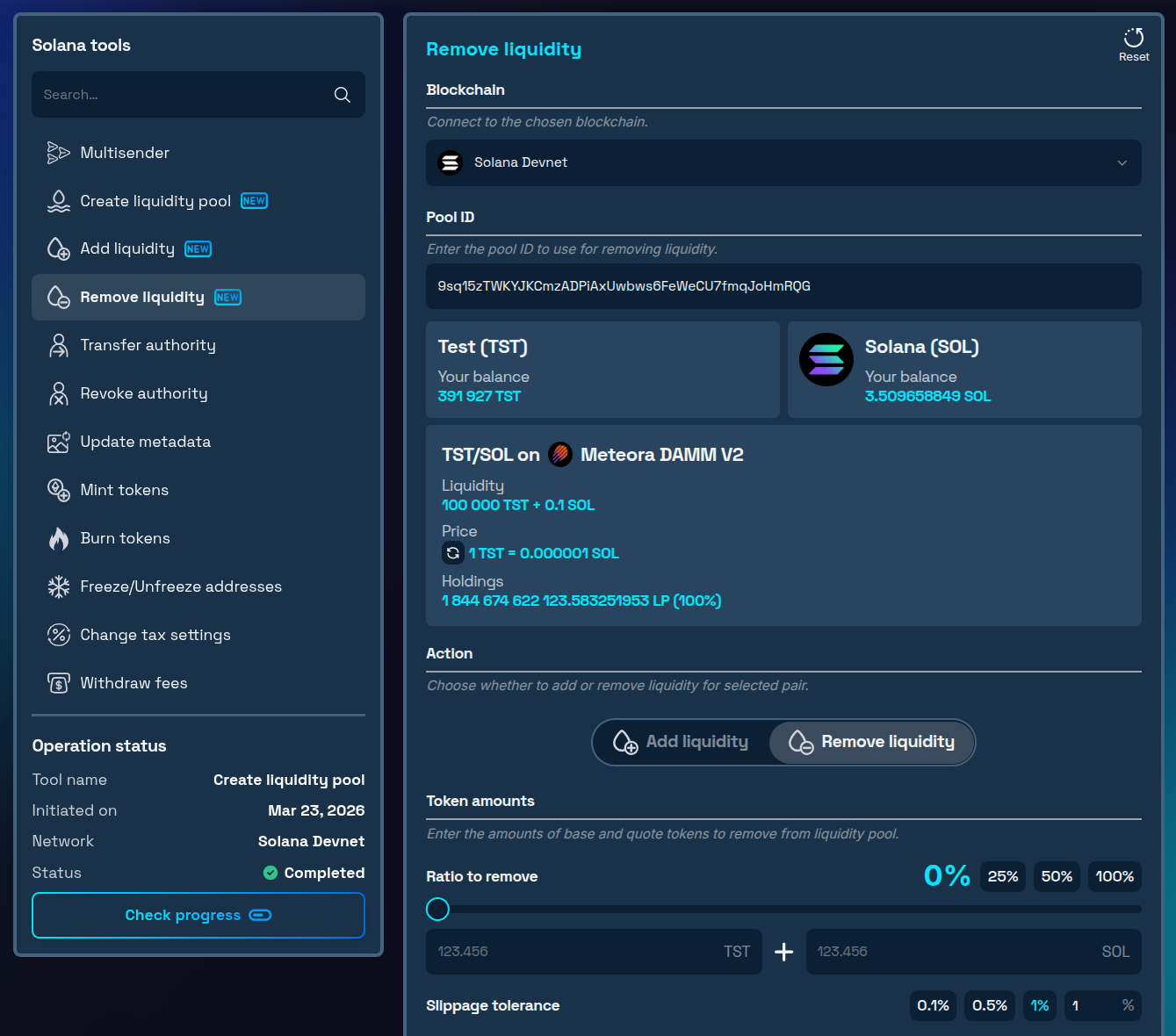
Any permanently locked or vesting-locked liquidity stays in the pool as configured - only the free portion of your position is available for withdrawal.
Post-Launch Monitoring
Once trading begins, Meteora's interface gives you a live view of all active positions tied to your wallet. Keep an eye on:
- Trading volumes and fees earned
- Price movements over time
- Overall pool health
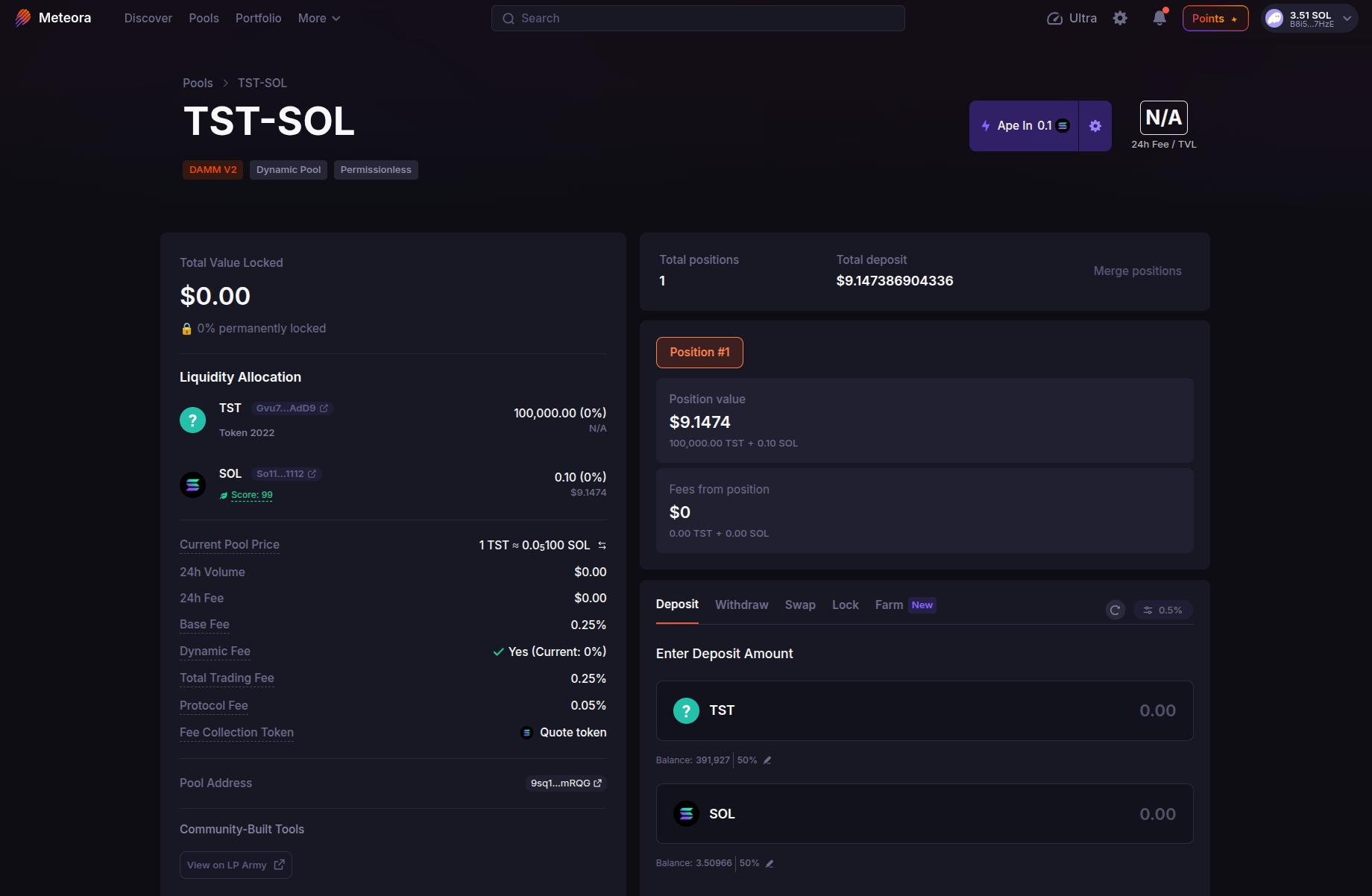
The first days after launch tend to be the most volatile - staying on top of your pool's activity during this period helps you catch anything unusual early and respond before it affects your token's market.
Burning LP Tokens
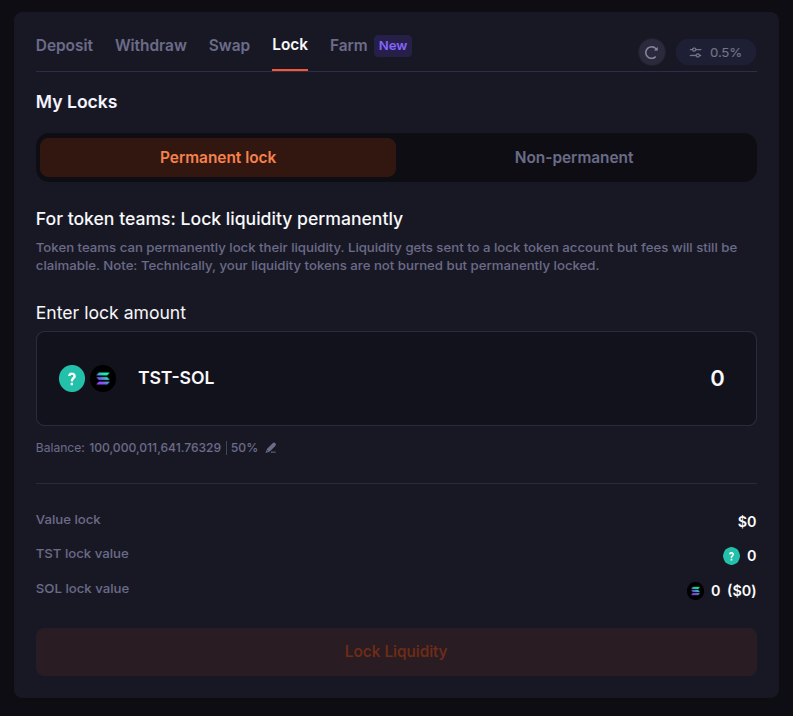
Burning your LP tokens represents the highest level of commitment you can demonstrate to your community. By permanently locking your liquidity, you make it forever inaccessible - no one, including you, can ever withdraw it. At the same time, you continue earning trading fees generated by the pool.
Meteora handles permanent locking natively - no third-party tools required. In Meteora interface for your liquidity pool navigate to the Lock tab in your pool, select Permanent lock, enter the amount, and confirm. Technically, your liquidity tokens are not burned but sent to a lock token account permanently - the effect is the same, but fees remain claimable forever.
This approach:
- Provides the strongest security guarantee for your token's investors
- Demonstrates long-term confidence in the project
- Continues to accumulate trading fees even after the position is permanently locked
Note: Permanent locking is irreversible. Once confirmed, there is no way to recover the LP tokens or withdraw the underlying liquidity. Make sure this aligns with your long-term plans before proceeding.
Locking LP Tokens
If you want to retain the option to manage your liquidity in the future, Meteora also offers non-permanent locking with a fully customizable vesting schedule - again, natively, without any third-party locker.
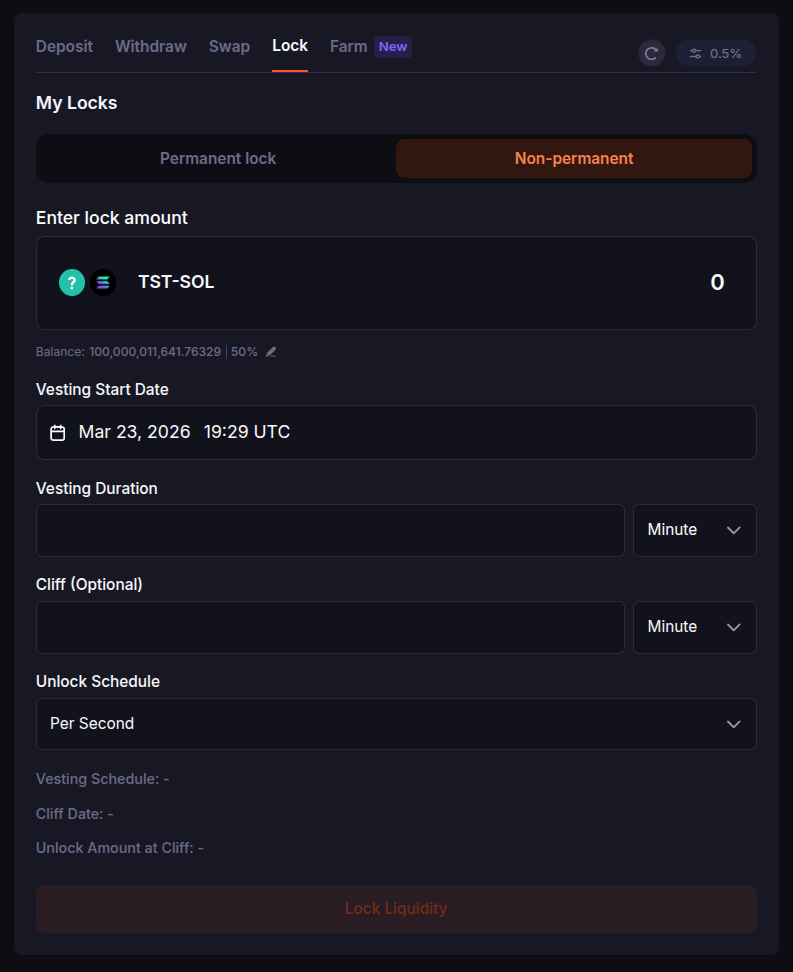
Navigate to the Lock tab, select Non-permanent, and you can configure:
- Vesting Start Date - when the unlock process begins
- Vesting Duration - how long the full vesting period lasts
- Cliff (optional) - a waiting period before any liquidity is released
- Unlock Schedule - how frequently liquidity is released (e.g. per second, per minute)
The lock is secured and verifiable on-chain, so anyone can confirm your liquidity is committed for the configured period.
This approach provides:
- Flexibility for future liquidity management as vesting completes
- Time-locked security that can be independently verified on-chain
- A meaningful trust signal without permanently closing off future options
Permanent locking sends the strongest possible trust signal to investors, while a vesting lock is more appropriate if you anticipate needing to revisit your liquidity strategy down the line.
Conclusion
Adding liquidity to Meteora is straightforward when you have the right tools behind you. By using 20lab's liquidity pool creation tool, you can go from token creation to an active trading pool in just a few steps - without needing to navigate multiple platforms or deal with complex setup requirements.
DAMM v2 offers one of the most cost-effective and feature-rich paths for new token launches on Solana, and by following the security practices in this guide - burning or locking your position and keeping an eye on your pool's performance - you'll be well positioned for a sustainable, credible launch.
For more support with token creation and liquidity pools on Solana, join our Telegram channel. Our team is here to help you succeed.


